
Do It Myself Blog – Glenda Watson Hyatt

Motivational Speaker

My Response to Nurse Ratchet

Filed under: Advocacy,Living with a disability — by at 2:37 pm on Wednesday, September 2, 2009

Dear East 31 Unit Manager,

On Monday, my husband was discharged from the East 31 Medicine/Neurology Unit after a two-week hospital stay for pneumonia. For the most part, he received good care, for which I am grateful. However, one incident was very upsetting.

Both my husband and I have cerebral palsy and use power wheelchairs for mobility. Yet, we live independently, without any attendant care. We have done a fair bit of traveling without any companions. We work well together as a team, as a married couple, to problem solve and overcome any obstacles.

Saturday afternoon, once his nurse had supervised his safe transfer into his power chair, we mentioned to her that we were going down to the cafeteria for a drink and for a change of scenery. She flipped! She said my husband, who turned 50 today, couldn’t leave the floor without a relative. My husband explained that I am his wife. The nurse told him to wait for his parents, who are elderly. She continued that we would have to take the elevator and that, if something happened, I was “incapable”.

Incapable of using the elevator? Incapable of helping my husband or of summoning help, if needed, in a hospital? The nurse knew nothing about me except that I use a power wheelchair/scooter and that she could not understand my speech. She knew nothing about my capabilities. Labelling me as incapable was not only demeaning and insulting, and dismissed my role as wife; her firm comment was also discriminatory.

Not wanting my husband to experience any reprisal from the nursing staff, we were good disabled people and begrudgingly stayed within bounds.

If the nurse’s comments reflect the unit’s policy, this archaic policy regarding people with disabilities needs reviewing. After all, this is 2009, not 1909!

Thank you for your attention in this matter so that another spouse with a disability is not dismissed in the future.

Sincerely,
Glenda Watson Hyatt
If you enjoyed this post, consider buying me a chai tea latte. Thanks kindly.

Related Posts

Da Wife on Wheels Dismissed Yet Again

Filed under: Living with a disability — by at 11:58 pm on Saturday, August 29, 2009

Being a married couple with both of us with cerebral palsy, there are times when one needs to move aside to allow In someone more capable. And, sometimes that means one of us must go it alone.

Last Monday, when we called for an ambulance because Darrell’s pneumonia wasn’t getting any better on the antibiotics prescribed during the previous Thursday’s trip to the emergency room (ER), the paramedics essentially dismissed da wife on wheels. Only one of them stopped to ask if I’d be okay while the others wheeled away my husband and took the time to understand when I asked, “Which hospital?”

For two days in the ER, I was constantly moving out of the way because there was no room for my scooter. The closest I could get to my husband was the foot-end of the stretcher.

Even once he was moved to a room, there were IV stands, bed tables and curtains to contend with. The only physical contact I had with my husband for the first few days was to rub his feet, which he hates, but it was the only body parts I could reach.

Yet, like any loving and concerned wife, I have made the 9 or 10-block trek on Surrey’s sucky sidewalks, hoping this hospital escapade doesn’t kill this scooter like it did last year, every day except for the day prior to my WordCamp presentation.

Today, on my trek up, I was thinking that if a nurse could be present, as required, while Darrell transferred from the bed into his power wheelchair, then we could downstairs to the cafeteria for a frozen cappuccino or, at least, go outside for some fresh air. I figured this was something we could do together as husband and wife, with minimal effort.

Once Darrell was safely in his chair, he informed the nurse that we were going down to the cafeteria. She flipped!

“No, you must go with a relative.”

“She’s my wife.”

“No, wait for your parents. What if something happens? She is incapable. You’d have go down in the elevator. No. Stay on this floor. Wheel around in the halls.“

WTF? Incapable? Of using the elevator? What could happen to Darrell, strapped into his chair? We’re only going to the cafeteria, for pete’s sake! Besides, I know how to yell for help if I need to!

Without knowing anything about me, except that I use a scooter and that she can’t understand my speech, she, a professional trained and caring nurse, labeled me incapable. She has no clue what I am capable of or how Darrell and I work together as husband and wife. She has no clue about the adventures we have been on or the trips we’ve made. I didn’t see taking the elevator down one floor as an insurmountable excursion!

When I took my marriage vows, no where did I say “…only if others deem me capable…”. Loving my husband means not putting him (or me) at risk, particularly while he is still in hospital recovering from pneumonia. If I didn’t think he could stay upright while driving his chair a few hundred feet and then suck back something other than water or apple juice, I would not have suggested such a risky proposition!

For today, we were good disabled people and didn’t go out of bounds. Tomorrow, Darrell’s mommy and daddy will hold his hands while we go downstairs. That will make the nurse happy…then Darrell and I will make a run for it!

If you enjoyed this post, consider buying me a chai tea latte. Thanks kindly.

Related Posts

Speech-to-Speech Service Not Available in Canada? Pity.

Filed under: Living with a disability,Social Media — by at 9:23 pm on Tuesday, August 4, 2009

One perk of being a blogger is that readers often email me with interesting information and tidbits. Today, my loyal reader Lori-ann emailed me about a speech-to-speech relay service that enables individuals with speech impairments to make phone calls.

The phone is definitely not my best friend. I’ve had callers hang up on me, swear at me; my husband warns his contacts that I might answer the phone and to be patient. As for me calling someone unfamiliar with Glenda-ish, forget it!

So, I was definitely intrigued by the service. This fully captioned video explains how the process works:

I am somewhat skeptical that a complete stranger would understand me, particularly on the phone, perhaps because, in 42 years, it has yet to happen. Unfortunately, I may never know if this service may be a viable option for me because it isn’t available in Canada. It is, however, available other countries, such as the United States, Australia, Sweden and Puerto Rico.

Wouldn’t it be ironic if, through using this new social media, we convinced the powers-that-be to make one of oldest form of communication accessible to Canadians with speech impairments?

Technorati Tags: ,

If you enjoyed this post, consider buying me a chai tea latte. Thanks kindly.

Related Posts

Tire Tracks on the Clean Kitchen Floor

Filed under: Living with a disability — by at 2:07 pm on Friday, July 10, 2009

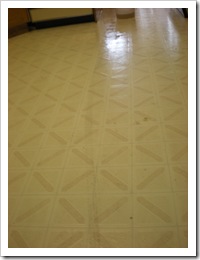
Wheelchair tire tracks on the kitchen floorLike many proud homeowners, loving wives and dutiful daughter-in-laws, I aspire to keeping a well-kept home.
However, no matter how many times my foot drags the wet cloth back and forth across the floor, no mater how long I wait for one section to dry before washing the next, and no matter how relatively cat hair-free I manage to get it, I always end up with tire tracks on the clean kitchen floor!

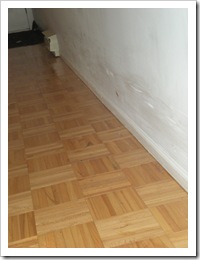
Scuff marks along the wallThe tire tracks on the floor go along with the scuff marks on the walls…
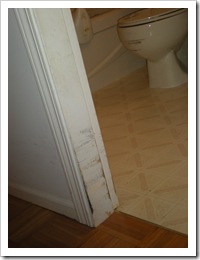
A chewed up doorway and scratched toilet bowl the chewed up doorways, and the scratched toilet.
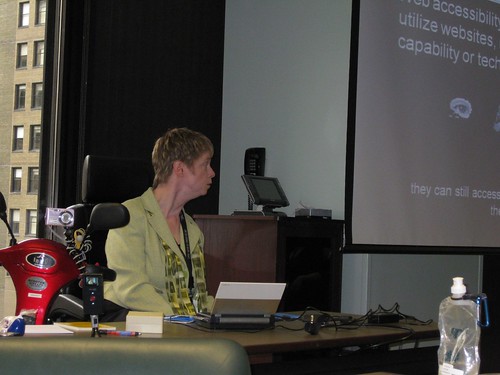
That’s life with two people who use wheelchairs indoors!

It’s unavoidable!

But, if the kitchen flooring ever gets redone, it’ll definitely be tiled in grime grey!

Technorati Tags: ,

If you enjoyed this post, consider buying me a chai tea latte. Thanks kindly.

Related Posts

How to Add Talking Captions to PowerPoint Presentations

Filed under: Living with a disability — by at 3:07 pm on Wednesday, July 8, 2009

Glenda Watson Hyatt presenting at SOBCon 09: Biz School for Bloggers
(Photo credit: Becky McCray)

The Dilemma

Create an amazing and fully captioned PowerPoint presentation for SOBCon: Biz School for Bloggers.

I had created a captioned presentation for AccessCamp San Antonio, but the synthesized voice of Kate wasn’t linked to the captions. Too many keyboard strokes were required, which meant too much room for error while presenting.

I needed a way to link the speech files to the captions and to minimize the keyboard strokes required during the presentation.

The Solution

Before creating the PowerPoint slides, I added caption boxes to the Master Slides, using Glenna Shaw’s wonderful tutorial as a guide. After some tweaks (which I may share later), several late nights and way too much Lindt 90% dark chocolate, I figured how to add talking captions to PowerPoint presentations.

As you will see from the video (or the step-by-step instructions below), the process is tedious, mind-numbing and very time consuming. For the most part, the video is the actual time it took me to complete each step to add the talking captions for the first slide. (My SOBCon presentation had 35 slides!) Of course, adding the captions came after the content was written and the slides were created.

The Video

The Step-by-Step Instructions

For those individuals who prefer written instructions,  here they are:

  1. Write the text in Microsoft Word or any word processor.
  2. Copy a caption-length of text.
  3. Paste it into the text-to-speech program TextAloud.
  4. In the Title box, type a filename using the format slide number hyphen caption number (e.g., slide 1-1) for easy identification.
  5. Listen to the text being spoken to determine whether any tweaks are needed so that the pronunciation and speed sound ok.
  6. Save the file. 
  7. Switch to PowerPoint 2007 and paste the caption text into the first caption box on the first slide. (How the caption boxes are created may be the subject of another post.)
  8. So that the captions scroll during the presentation, the animation added when the caption boxes were created now need to be activated. Click on the Animation tab along the top, and then click Custom Animation. The Custom Animation panel opens on the right side of the screen.
  9. On the first box that reads Layout:Body, choose Copy Effects to Slide from the dropdown box. This adds all of the caption boxes to the animation list.
  10. Link the speech file to the caption by choosing Effect Options from the first animation’s dropdown box.
  11. A dialog box pops up. From there, click on Sound and type the letter o for the short cut to Other Sound…
  12. Locate and select the speech file. Click OK. The first talking caption is complete.
  13. Repeat the process for each caption.
  14. Remove the unused boxes so that blank boxes do not appear in the presentation by zooming out to 20% to view the slide and all of the caption boxes and then select the unused boxes.
  15. On the Custom Animations panel, click Remove. This removes the unused boxes from the animation list. However they still remain on the slide, which is handy in case more captions need to be added later to the slide. The unused boxes will not appear in the presentation because they have been removed from the animation list.
  16. Repeat the entire for each slide show.
  17. See what the presentation actually looks like by hitting F5 to begin the slide show.
  18. Appropriately reward yourself!

The Result

A rockin’ presentation at SOBCon!

Although the process is tedious, mind-numbing and time-consuming, the end result is impressive. Captions and slides are advanced by hitting the space bar. Should I accidentally hit the space twice, the error is quickly rectified by hitting the back arrow key. It means I, with a significant speech impairment, can give a captivating presentation!

Why am I sharing this?

For three reasons:

  1. Creating this video was an experiment to see if I could and how long it would take me to create a fully-captioned instructional video using Camtasia for the screen captures and the voice of Kate. (The answer: three days!)
  2. In case someone else in a similar situation can use this solution. Or, if this solution may spark other ideas or uses.
  3. To invite feedback and ideas on how to simplify or improve this process. I would like to give more presentations of this nature, but it is a rather time-consuming project. Preparing presentations this way, I could only prepare 3-5 per year, realistically.

Comments are open. Let’s hear your ideas!

If you enjoyed this post, consider buying me a chai tea latte. Thanks kindly.

Related Posts

« Previous PageNext Page »