Do It Myself Blog – Glenda Watson Hyatt

Motivational Speaker

Where Would I Be Without Technology?

Filed under: Living with a disability,Work — by at 4:56 pm on Thursday, February 12, 2009

What a week, technologically speaking!

Last week my beloved word prediction and completion software EZ Keys died unexpectedly. This software saves me a fair number of keystrokes. Without it, I type every single letter. My left shoulder is screaming, my arm is about to fall off, and my wrist wants to be put on ice for a week!

The tech support guy kindly offered to put a software replacement cd in express mail. That was a week ago! I understand times are tight and everything being cut back, but how long does mail from California to British Columbia take?

Meanwhile, I am using Microsoft Windows’ accessibility feature StickyKeys for holding down multiple keys at once. (To find StickyKeys and other handy accessibility tools in Windows XP, go to Start > Control Panel > Accessibility Options).
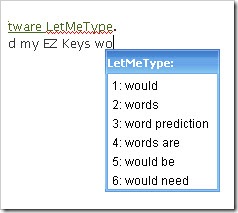
LetMeType words box i am also using the free word prediction software LetMeType. With some tweaking, Darrell was able to load my EZ Keys word list into LetMeType so that I wasn’t starting from scratch.

LetMeType isn’t as powerful as EZ Keys. I am missing the automatic space after the software finishes typing a word, the automatic capital after I type a period, and the shortcut keys for word suffixes. But, because the LetMeType word box doesn’t appear until after I type two or three letters, I can easily use the number keys and the characters above them – something I am constantly fighting with in EZ Keys. LetMeType is quickly learning my language, often showing word choices with two or more words. A nice little program available for free.
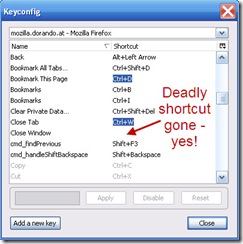
The keyconfig dialog box with the Close Window shortcut turned off Then last night, while writing a lengthy comment on Wendy Piersall’s post, I discovered that accidentally hitting Ctrl+shift+W in FireFox is deadly. Do not try this at home! The internet browser closes without any warning, regardless of what you were doing. This sent me searching for a way to turn off specific keyboard shortcuts in FireFox. I found a way to turn off shortcuts, eventually! This adds KeysConfig… to the Tools menu (or the shortcut is Ctrl+shift+F12). The list of possible keyboard shortcuts can then be modified.

Along the way, I discovered the FireFox Accessibility Extension, which I, of course, had to install. I suspect this toolbar will be useful in other projects that are in the works.

(I’ve yet to return to Wendy’s post to retype my comment. Sorry, Wendy.)

AccessCamp San AntonioAll of this is happening while I should be frantically preparing my presentation for San Antonio’s AccessCamp on February 21st. The plan is for me to present online to the group located in San Antonio and to use Skype’s text chat feature to answer questions. Right?!

Off to play with the free and easy-to-use screen sharing tool Mikogo and to learn how to add captions to a PowerPoint presentation…

I need chocolate!

How is your week going?

If you enjoyed this post, consider buying me a chai tea latte. Thanks kindly.

Random Posts

7 Ways to Communicate When Speech Impaired

Filed under: Living with a disability — by at 1:36 pm on Wednesday, February 4, 2009

Reader's Question

A young man with athetoid spastic cerebral palsy emailed me last week. He uses a Dynavox communication device and asked how I communicate, given my speech impairment, in hopes he may benefit from how I do it.

Glenda's Response

I am responding here in case how I communicate also benefits or triggers ideas for some of my other readers. I use a variety of communication methods; the method I use depends upon the situation.

Here are seven methods I use to communicate:

  1. Speak Glenda-ish: People who know me and strangers who take the time to actually listen do understand my unique dialect. Once individuals master Glenda-ish, I can talk their ears off for hours! In fact, only medical professionals have used the label non-verbal because they don’t take the time to try to understand me.
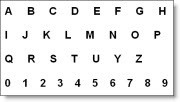
  2. A sample alphabet card Use an alphabet card: I have made several variations of this low-technology communication device over the years. During my university years, my alphabet card became my security blanket: I didn’t leave my apartment without it. 
  3. Type notes: For short messages like “I would like a book of stamps, please” or “I would like off at the bus stop near Laurel and Canada Way, please”, I type out a note before leaving home.  Post-It notes are great for this purpose. 
  4. Use Kate with PowerPoint: When giving a presentation, I convert the text into speech using TextAloud and NeoSpeech’s Kate voice. I then embed the sound files within my Microsoft Powerpoint presentation.  The process is time consuming, but it works!
  5. Use my laptop: When having a small group discussion with individuals not well-versed in Glenda-ish, I type my point on my laptop and then either have Kate read it aloud or have a fellow group member read it off the screen.
  6. Send email: Email has enabled me to communicate with people I would not have otherwise. Because email is asynchronous, my slow typing speed is not a factor. I can take the time needed to express my thoughts in the written word, my most effective means of communication, before hitting the send button.
  7. Skype with webcam: With individuals somewhat familiar with Glenda-ish, I call them using Skype and my webcam. Watching me while I speak helps their understanding. If they get stuck on a particular word, then I use the text chat feature to type the word.

    Being labeled non-verbal or speech impaired does not mean I’m non-communicative.  It means finding other ways to get my message across. 

    If you enjoyed this post, consider buying me a chai tea latte. Thanks kindly.
    Random Posts

    Going Beyond Social Media to Connect Deeply

    Filed under: Living with a disability,Social Media — by at 4:06 pm on Tuesday, January 27, 2009

    Glenda Watson Hyatt and Lorelle VanFossen laughing it up Darrell and I are enjoying Lorelle VanFossen’s company following WordCamp Whistler (a day long session on using the blogging platform WordPress). While the snow falls yet again, we are having an intimate WordCamp Hyatt – you may notice some changes on my blog, and we’re having great conversations – many of which are unbloggable! But there is one story that is safe to share:

    Lorelle and her husband spent six years in Israel. The first year in the country, Lorelle struggled with the language, carefully choosing her limited Hebrew to communicate her message. Without being able to communicate freely with others around her, a feeling of isolation crept in As time passed, her Hebrew became somewhat more fluent and the isolation began melting away.

    Returning home to the United States, Lorelle was relieved to hear English all around her. She no longer had to struggle to make her point known in a few precious words. She could freely speak, using as many words as she liked. However, she then became aware of how much of the spoken word is wasted breath. People may utter many words without saying anything at all.

    Exactly!

    I now knew she understood how much of a struggle it is for me to speak Glenda-ish around others who don’t understand Glenda-ish; how much I struggle to find clear words to get my point across. But when I’m with people with a Masters in Glenda-ish, I can talk off their ears for hours!

    I am also amazed by the wasted words people speak. To me, those unnecessary words are such a waste of precious resource. Why do few people think before they open their mouth? Could this resource not be used more productively, more efficiently, more lovingly?

    While the three of us were sitting in Darrell’s office, talking, another equally valuable realization struck. All of this social media is awesome for meeting people and for maintaining surface relationships. Having all of these tools to connect with hundreds or even thousands of people is empowering and liberating. However, intimate face-to-face time is when the deep connections are formed and memorable moments are made.

    Regardless of the number of Twitter followers, Facebook friends or StumbleUpon subscribers, the time spent snowed in with Lorelle talking, laughing, eating and forming a deep connection will be a cherished memory for years to come.

    My advice to you: close TweetDeck, turn off your iPhone and take some time have a meaningful conversation and laugh with someone dear to you. Make a memory, today, that you will cherish for lifetime.

    If you enjoyed this post, consider buying me a chai tea latte. Thanks kindly.

    Random Posts

    Why Barack Obama’s Inauguration Fills Me with Hope

    Filed under: Living with a disability — by at 12:32 am on Tuesday, January 20, 2009

    On the eve of Barack Obama’s inauguration, I find myself reflecting upon the significance of an African-American becoming President of the United States.

    I humbly admit that I do not know what it is like to be discriminated against and discounted solely because of the colour of my skin. I have not experienced racial segregation or the humiliation of being forced to use a side entrance because I am seen as less than a person. I have not personally witnessed the atrocities committed against the Blacks.  I have not felt the sting of systemic racial inequality in the workforce.

    However, I do know what it is like to be discriminated against and discounted solely because of my disability – or perceived disability. I have experienced segregated classes and programs specifically for the disabled. I have experienced the feeling of less than when using an accessible entrance around the back. I have been sickened by the appalling treatment of far too many people with disabilities. I face the sting of living below the poverty line and being on social assistance, for now.

    If an African-American President can reside in the White House, empowering all African-Americans and quashing racial discrimination, then hope exists that discrimination based on disability can also be overcome and we can all be “judged on the content of our character”.

    In his speech on Sunday from Lincoln Memorial, President-elect Barack Obama spoke these words, filling me with hope:

    …a belief that if we could just recognize ourselves in one another and bring everyone together – Democrats, Republicans, and Independents; Latino, Asian, and Native American; black and white, gay and straight, disabled and not – then not only would we restore hope and opportunity in places that yearned for both, but maybe, just maybe, we might perfect our union in the process….

    Together, yes, we can!  

    If you enjoyed this post, consider buying me a chai tea latte. Thanks kindly.

    Random Posts

    Canada’s Registered Disability Savings Plan – The World’s First!

    Filed under: Living with a disability — by at 2:52 pm on Tuesday, January 13, 2009

    Living on social assistance is like living in a perpetual catch-22. If you are thrifty enough to save a few dollars a month, you can’t officially save it because then that means the government is paying you too much and your benefits are reduced accordingly. Yet, occasionally you have expenses (say, a $1895 scooter and a $4300 paint levy for your condo) that social assistance doesn’t cover, but that you still must pay. Also, any sizeable financial gift from a parent or friend for said expense gets deducted from your monthly cheque. This leaves you resorting to creative financing (choosing my words carefully) and a few sleepless nights.

    Until now.

    Thanks to years of tireless effort by the Planned Lifetime Advocacy Network (PLAN), Canada has introduced the world’s first Registered Disability Savings Plan (RDSP):

    a savings plan designed specifically for people with disabilities in Canada. The first of its kind in the world, this new tax-deferred savings vehicle will assist families in planning for the long – term financial security of their relatives with disabilities.

    According to PLAN, a RDSP is similar to a Registered Retirement Savings Plan (RRSP) and “is designed specifically for people living with a disability. It allows anyone already eligible for a disability tax credit to invest savings tax-free until withdrawal, up to a lifetime limit of $200,000. Friends and family members can also contribute to the RDSP of a loved one.”

    To encourage Canadians with disabilities to open RDSPs, the Government of Canada has established the Canada Disability Savings Grant and the Canada Disability Savings Bond, which will match eligible contributions, significantly increasing the savings in a plan. (The Canada Revenue Agency provides further information on RDSP.)

    For British Columbians with disabilities living on social assistance, the pot became a little sweeter today with the provincial government announcing the Endowment 150 Fund which “will allow any British Columbian on income assistance to apply for $150 once they have set up an RDSP with $25.  This initial investment has the potential to leverage  a grant of $525 and a $1,000 federal bond. Within one year, clients can earn $1,700 plus interest from their original investment of just $25.”

    The deadline for 2008 contributions has been extended to March 2, 2009. Currently, the Bank of Montreal is the only financial institution, outside of Quebec, offering RDSPs. The Vancouver City Savings Credit Union is developing a product, but it may not be available in time to make 2008 contributions. Other financial institutions are also likely in the process of developing similar products. However, only contributions made by March 2nd will be eligible for the 2008 matching funds by the federal government.

    A word of caution: as with any financial investment, read all of the fine print and details, and talk with a reputable person to make sure a RDSP is right for you or a loved one with a disability.

    Watch the Registered Disability Savings Plan Blog for the latest updates and information.  (Tip: “Subscribe by email” to receive the updates in your inbox. It saves constantly checking the blog.)

    If you enjoyed this post, consider buying me a chai tea latte. Thanks kindly.

    Random Posts

    « Previous PageNext Page »