Neuroplasticity: What If Brain Damage Need Not Be Permanent?

Yes, that is Montel Williams! At the HealthTech Innovation Hub in Surrey.
Please forgive the quality of the photo. The story behind the photo is of much more significance.
I will attempt to explain the circuitous journey that brought me to this point.
A few months ago, Dad strongly recommended that I read Norman Doidge’s books The Brain That Changes Itself and The Brain’s Way of Healing – both of which explore the field of neuroplasticity. I had heard of neuroplasticity and the possibility of reprogramming one’s brain through Riley Dayne’s The Abundance Factor movie and program and, although intrigued, I had yet to explore deeper. It just hadn’t yet become a priority.
However, with Dad’s continued talk about the topic and fall weather upon us, I borrowed Doidge’s second book from the library – thinking that starting with his most current book made the most sense – and curled up in bed and started reading. It isn’t the easiest book to read, perhaps because I am not the fastest and most avid reader; I ended up renewing the book three times.
But, fascinating!
How scientists, researchers and forward-thinking medical professionals are using light, sound, electrical stimulation, constraint-induced movement therapy and the like to treat conditions that, until now, were thought to be unchangeable; conditions like traumatic brain injuries, Parkinson’s, autism, dyslexia, cerebral palsy and such.
As a child I endured years of physio, occupational and speech therapy and several torturous orthopedic surgeries. All were to treat the effects of cerebral palsy, but no one ever treated my “damaged” brain, the root cause of my disability. I received nothing like treatments discussed in this book.
The chapter about the PoNS (Portable Neuromodulation Stimulator) – a device used to non-invasively stimulate the nerves in the tongue, two inches from the basal ganglia in the brain — completely enthralled me. I consulted with Google and kept digging. This is when the journey began getting exciting.
I discovered that former TV host Montel Williams, who was diagnosed with multiple sclerosis in 2000, began seeking out options when his symptoms started progressing in 2007. According to the CTV news story, he came across the tongue device being tested in a research lab at the University of Wisconsin-Madison.
Montel was so impressed with the results he experienced using the device that he co-founded Helius Medical Technologies to “partner with top organizations to pioneer unique, noninvasive platform technologies that support neurological wellness.” (This might be an oversimplification of the details. I’m still reading! More background is available on the Helius website.)
With some more digging, I also discovered that Helius had conducted a pilot study using the PoNS device on children with cerebral palsy in Russia. The results sound promising, although I have yet to find a copy of the study translated into English. However I did find this video from the 2015 Russian Pilot Study:
I know not to believe everything I see on the internet and to question all; however, watching this video made me want to know even more. Perhaps there is something here that is legit. Perhaps permanent brain damage need not be permanent or, perhaps, not as severe.
Coincidentally (or not), in mid-November, as I was beginning to wonder if there were any local resources related to neuroplasticity and where I might start looking, co-chair of Surrey’s Measured Up Committee Marco Pasqua emailed committee members with the link to West Coast Centre for Learning (WCCL) as a interesting new resource in the community. Likely because I was avoiding a boring task or some other reason for procrastinating, I spent some time poking around the site and I was intrigued. Without overthinking it, I emailed them for more information.
After several emails back and forth with Lynda Brind Dickson, the Coordinator of Community Learning Partnerships about what WCCL does, about my interest in neuroplasticity and such, we scheduled a time to meet. Heavy rains were forecasted; we postponed our meeting.
Meanwhile, I kept poking around. WCCL is located at HealthTech Innovation Hub, which is in a new building across from the Surrey Memorial Hospital – all of which are located along the City of Surrey’s Innovation Boulevard. From what I understand (at the moment), HealthTech is an incubator for brain health technologies; WCCL is one of the several businesses developing software, applications and devices in the space. It is all very exciting and somewhat futuristic-sounding.
Lynda and I rescheduled; a major snowfall was forecasted. We postponed, all the while continuing to chat via good ol’ email.
I kept reading Doidge’s The Brain’s Way of Healing and poking around online, connecting the dots.
Then, bingo!
I found a local announcement seeking individuals with traumatic brain injuries (TBIs) for a clinical trial of the PoNS device. Helius Medical Technologies had received from the military to conduct a proper, double-blinded clinical trial of the PoNS. AND…HealthTech Connex was one of the four test sites!
The device that I had read about in Doidge’s book, that Montel Williams had tried at the U of Wisconsin and, subsequently, co-founded Helius, that had been piloted with Russian kids with cerebral palsy was now in clinical trials a mere five blocks from where I am writing this.
Christmas came and went, snow fell and melted, fell and melted. Lynda and I scheduled to meet on February 10th because, surely, by then the snow would be gone for good. We were wrong. More than a foot of snow over the prior weekend, which is really unusual in Surrey in early February. I knew I would be snowed in yet again for, at least, another week. However, I was determined I would make our meeting this time, even if I had to take a taxi.
While I waited for the snow to melt, Lynda connected with a few more people that I should meet with – or, at least, be introduced to – while at HealthTech on Friday. One such connection was sure to be Pauline Martin at NeuroMotion Physio, which provides the physio component of the PoNS clinical trial at the Surrey test site. Pauline and I went to high school together.
AND…Montel Williams was going to cut the ribbon on the neuroscience wing on Friday! I had to be there.
Friday morning I checked my email as I was getting ready and…Lynda was stranded in Merritt (in the interior of British Columbia) because the Coquihalla Highway (and every other highway into the Greater Vancouver area) were closed due to treacherous weather conditions. Seriously?!
After a flurry of emails, it was deemed that I should still go, and connect with Pauline and a Mike about a brain scanning device. And see what happens after that. My husband called a taxi for me; it was nice to escape house arrest for a while.
I met up with Pauline, who kindly gave me a brief tour of the shiny new space. Then I met with Mike and one of his colleagues to demo their brain scanning device, which, unfortunately, the sensors didn’t work through all of my hair – an issue that will surely be addressed in prototype tweaks. The end goal is to have a device that general practitioners – or, even, individuals themselves – can use to check their general brain health, much like monitoring blood pressure to check their heart health. I can see it becoming a craze similar to the FitBit. The more sophisticated professional device will be used to assess concussions and such; for example, to determine when a hockey player is well enough to return to the ice.
Going with the flow of the day, I enjoyed a nice lunch with people whose most names I do not remember. (Obviously I need to work on my memory skills!) Although I was not officially introduced to Montel Williams, I did sit at the same long boardroom table (in an impressive space) for lunch. I did chat with Dr. Ryan D’Arcy – a co-founder and senior scientist/entrepreneur for Health Tech Connex Inc., full Professor at Simon Fraser University, and a few other hats. Thank goodness for my iPad and Proloquo4Text.
Through our conversation, I learned that the latest version of the Magnetoencepalography (MEG) – initially developed by Hal Weinberg – was now located at Surrey Memorial Hospital. I had taken a psyc course with Professor Weinberg years ago at SFU. Can this day have any more “connect the dots” moments?!
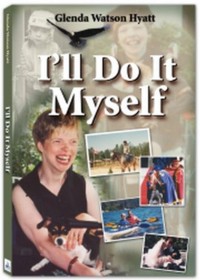
I didn’t get to stay for the ribbon cutting as a taxi was called for me soon after lunch. I went with the flow. I did, however, leave an autographed copy of my book I’ll Do It Myself for Montel.
Results from the clinical trial with subjects with mild to moderate TBIs will be known in three months. Two other conditions – and very possible a third in a year – are slated for clinical trials using the PoNS. I am hesitant to name the three conditions at this point because I don’t know if it is public knowledge, yet. (Everything else shared here is available online.) It is suffice to say that I am extremely excited, both for myself and many of my friends and colleagues.
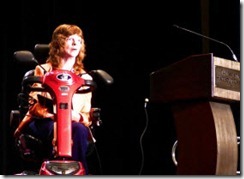 As I mentioned in an email to Lynda, I am not looking for a miraculous cure, to be walking straight and talking clearly. But, what if some improved functioning is possible? What if more controlled movement is possible? What if I could deliver a speech, using my iPad, without being so tense and jerky on stage? What if I could get through an average day without being totally exhausted?
What if…?
To keep up with my adventures, musings and insights, sign up to receive my future posts via email.
If you enjoyed this post, consider buying me a chai tea latte. Thanks kindly.
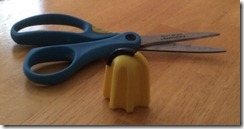 More often than not, using scissors when left-handed is frustrating. The scissors tend to fold paper, rather than cut it. Add in limited hand function due to cerebral palsy and some tasks, like opening a plastic package, leaves me screwed.
 With headaches so painful I felt like I would puke, an optometrist appointment was reluctantly made.
  Receive blog updates via
email
Receive blog updates via
email Subscribe via RSS


