Do It Myself Blog – Glenda Watson Hyatt

Motivational Speaker

Don’t Believe Everything You Read, Write Your Own Truth

Filed under: Living with a disability,Motivation — by at 3:36 pm on Monday, July 19, 2010

Somewhere in my possession I have a letter from a medical specialist, written when I was young, stating my diagnosis – quadriplegic athetoid cerebral palsy, that I am functionally non-verbal and that I require 24-hour nursing care.

That letter surfaced to consciousness while I have been feverishly working on my presentation for the Plain Talk Conference – a conference on communicating plainly and clearly in the health industry – to be held in Alexandria, Virginia, next week!

I have also been making arrangements for the four-day trip. A tour of Washington, DC, may also be on my itinerary! I’ll be traveling alone; without a nurse attached.

Why am I sharing this?

Letters are written, notes are made in files. Sometimes these words are necessary to “play the game” to get the service, the equipment or the medication necessary when living with a disability.

But, those written words do not define who you – or a loved one with a disability – are. Leave those words on the paper, in the file. Only you can choose the words that define and describe who you truly are, your own truth.

The words I’m choosing to define myself today, at this moment, include:

I am a creative and innovative solopreneur who happens to have cerebral palsy and uses an electric scooter for mobility. I do have a significant speech impairment and, because of that, I have developed a unique way to deliver riveting presentations. At times I do require assistance; my virtual assistant and editor have been invaluable these last few weeks. Today I am too busy to be disabled.

What words do you choose to define and describe yourself today?

Technorati Tags:

If you enjoyed this post, consider buying me a chai tea latte. Thanks kindly.

Related Posts

The iPad as an Affordable Communicator: A Follow-up Review

Filed under: Living with a disability — by at 1:22 am on Sunday, July 4, 2010

While I was at the mall last Tuesday, I also made a hair appointment. In the old days I would have typed a note before leaving home. Or, I would have asked Darrell to call for an appointment.

Tuesday I pulled out my iPad, typed a message in the Proloquo2Go app and showed it to the receptionist. An appointment was made for the following day.

Screen shot of the typing mode in Proloque2Go on the iPad

Continuing with my day of playing hookey, I decided to treat myself to lunch at A&W. Once again I typed out my order before scooting up to the counter. However, in the process of placing my iPad on the counter to show the employee, I must have somehow hit the “clear” or something because my order had disappeared. It reminded me of my old Etch n Sketch: shake and everything erases.

I managed to blurt out “Mama Burger”, but “root beer” was lost.

A hair appointment and a Mama Burger – two out of three ain’t bad!

Obviously I need to learn where the “clear” button is to avoid accidentally hitting it or I need to find another app for this purpose – one that doesn’t erase when shaken.

The one thing I do like about Proloque2Go for this purpose is the font size, which is fairly large for when showing someone else. But, if the message disappears in the process of showing another person, then clearly Proloquo2Go is not the right app for this particular purpose.

The next option I’ll try is the app My Writing Nook, which I purchased for a whopping $4.99 for writing on my iPad. The font size can be increased to 36 point, which may be large enough for someone else to read from a comfortable distance. Documents can be saved and quickly brought back up if needed.

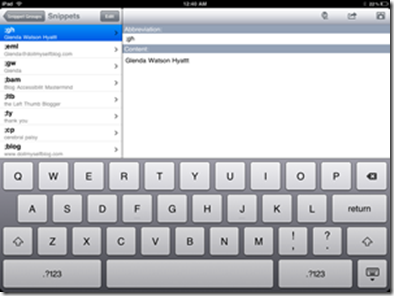
Thanks to a tip from Chris Brogan, I’ve also purchased the TextExpander app for another $4.99. This app automatically expands abbreviations; for example, when I type “;gh“ (without the quotation marks), it automatically expands to “Glenda Watson Hyatt”. This is similar to the abbreviations feature in my E Z Keys software, but for a fraction of the cost.

The TextExpander app on the iPad

TextExpander works with several iPad apps, including My Writing Nook. To have it also work with Proloquo2Go would be a cool addition to the communication app.

If you enjoyed this post, consider buying me a chai tea latte. Thanks kindly.

Related Posts

Why I Stood Up Chris Brogan for Our Karaoke Duet

Filed under: Living with a disability — by at 11:30 am on Tuesday, May 18, 2010

Glenda Watson Hyatt and Chris Brogan
(Photo credit: Duong Shehan)

On the Sunday morning of last year’s SOBCon (a conference for Successful and Outstanding Bloggers), Chris Brogan said he missed me at karaoke the previous night and that he had a song in mind for me; one he felt I could sing because it only has one word – Tequila!

Honestly, I had never pictured myself doing karaoke, but I was touched that Chris had pictured it and had given it enough thought to have a song in mind. “Next year,” I said with a smile!

For the most part, when I say I’m going to do something, I do it. It may take me a while, but I try to keep my word. I didn’t brush off and forget “next year”. For months after SOBCon09, I kept thinking, What have I gotten myself into this time?

Then I went ziplining across Robson Square, completely blurring the line between ability and disability, between can and can’t, and whatever other arbitrary lines that exist, and leaving me at the point where I’m saying, “Bring it on, Life! I’m ready!”

Karaoke? What’s the worst that could happen? I could make a fool of myself on stage for four minutes. Like no one else has ever done that before at karaoke! Besides, once everyone else is sufficiently imbibed, I may sound pretty good.

Shortly before leaving for Chicago, I asked Chris if we were still on for our karaoke duet. (I’m unsure whether Chris originally intended Tequila to be a duet, but I figured we might as well have fun together while I’m making a fool of myself.) In typical Brogan-style, he responded with an enthusiastic yes!

Saturday evening a group of us were hanging out at Morton’s Bar & Grill, getting organized to head over to the Blue Frog Bar & Grill to meet up with fellow SOBs for karaoke. My friend Hope kindly phoned the Blue Frog to ask if they are wheelchair accessible. They aren’t.

The group left for the Blue Frog. I went back to the hotel to go bed, disappointed. In that moment, inaccessibility wasn’t about the law, my rights, or me being part of an under tapped market. In that moment, it was about missing the opportunity to do something crazy and unexpected with someone I admire, respect and trust.

Perhaps next time, Chris!

If you enjoyed this post, consider buying me a chai tea latte. Thanks kindly.

Related Posts

The iPad as an Affordable Communicator: Initial Review

Filed under: Living with a disability — by at 2:22 pm on Saturday, May 15, 2010

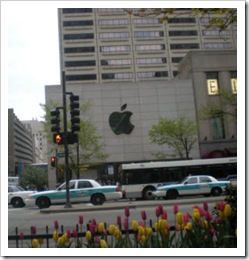
The Apple Store in Chicago

While in Chicago, I made a short trek to the Apple Store. My mission was to try out an iPad, which are still unable here in Canada until May 28th, to see if I could reliably use the touch screen with my shaky athetoid cerebral palsy. The reason for wanting an iPad is to use it as a communication device while I’m out and about.

I spent an hour playing with the thing, not quite sure what I was doing. Although I did manage to get a tweet out with minimal typos:

A twitter update reading: Trying an ipad NOW. Test 123. Man, My arm hurts now.need more practice!

Once I had had enough playing, I attracted the attention of the young Apple employee Courtney and indicated that I was ready to buy one. She said they were sold out. My heart sank. Then she found one in the back room, and when an employee looked surprised, she said that one was special. (I sensed a shipment had just arrived, but had yet to be inventoried.)

Courtney spent a good hour with me, activating the device and then setting up an iTunes account to download the Prologuo2Go appp. I was impressed by the time she spent with me, as well as how she treated me. Thanks Courtney!

In the end, I purchased the iPad 32G WiFi, iPad case and the protection plan (I usually don’t buy them, but just in case) for $802.40 USD (including tax) and $215 in iTunes gift cards for the app (there was glitch with me being from Canada and purchasing gift cards to buy the app was the work around). In theory, I now had a communication device plus much more for $1,217.40 USD. That’s what credit cards are for, right?!

I left the Apple Store completely amazed by Courtney’s service, but not totally convinced I had made the right decision with purchasing the iPad.

I then headed back to the the hotel where I was meeting my friends Karen and Amy, one of which is Deaf and the other is hearing impaired. I only had a brief time with my iPad before putting it to the test as a communication device. But, that was long enough!
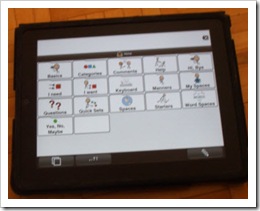
Proloque2Go grid view on my iPad I discovered the Proloquo2Go app also has keyboard, as well as the predefined categories and phrases, which will take some learning and memories where specific words are. The neat thing is phrases can be added and customized, which may prove useful over time – once I get to add them.

But, the keyboard proved the most useful. When I’m communicating with people, they typically get stuck on a word or two. With the onscreen keyboard, I can type out the words – like I did with the low-tech alphabet card but remembering what I had pointed to was tricky for some people. With the iPad, they can read what I had typed – or I can have it “speak” the words, Although that was pointless for Karen and Amy who couldn’t clearly hear the text-to-speech voice.
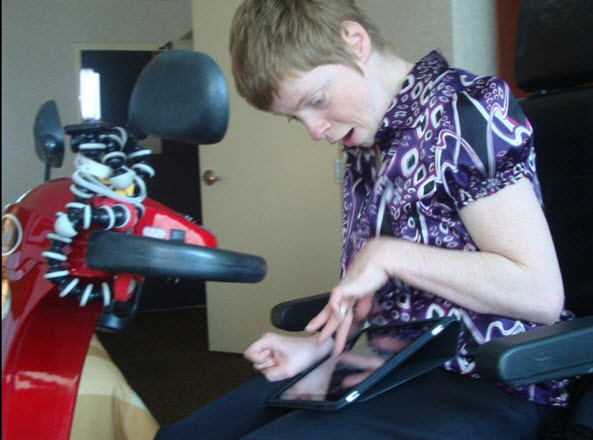
Glenda using her iPad
(Photo credit: Karen Putz)

Later that evening I attended the Social Media Club event. Again, the iPad proved useful for communicating. And, even later at the bar, hanging out with Ben Curnett, George Krueger and Mary-Lynn Foster and others.

Mary-Lynn and I were having quite a conversation. Because of the iPad’s back light and clear display, we had no trouble using or reading the iPad in the dimly lit bar. The font size in the Proloque2Go app was also large enough to read from a comfortable distance.

The really cool thing was, because the Holiday Inn and bar had WiFi, I had internet access. When Mary-Lynn asked what I had been up to and I responded problogging and ghost writing, I was able to go to the dotgov blog to show her what I had written. I also showed her the video of me ziplining. The iPad allowed for another level of communication I would not have had with another communicator.

Another night a group of us were at Morton’s Bar and Grill, making plans to go to karaoke, which turned out to be inaccessible but that’s another story. My friend Hope was having trouble figuring out what I was saying and she asked, “Where’s your iPad?” In that moment, I felt a sense of normalcy and acceptance. Using an iPad, which could become as commonplace as the Blackberry and iPhone, is not yet another thing that makes me different. I wasn’t using a strange, unfamiliar device to communicate with this group. People were drawn to it because it was a “recognized” or “known” piece of technology rather than being standoff-ish with an unknown communication device.

I liked how as soon as I turned it on and slid the lock, the thing was ready to go. There’s no need to wait for it to boot or for programs to start; the apps start immediately. Although there were a few times when the iPad appeared unresponsive, even when others tried it. I found restarting fixed that; perhaps there’s another trick when that happens that I have yet to discover.

Initially I held that iPad in the landscaped position on my lap, giving me the largest size of keyboard. This way I was able to steady my hand against my abdomen and type with more than only my left thumb, which was a novel concept. And, at times, the screen would spin around and I would need to type upside down until I figured out to spin the screen back. A way to turn down the spinning sensitivity would be great.

Typing accuracy wasn’t perfect; I was discouraged and having second-thoughts about my purchase. But, a few days ago I realized my typing wasn’t perfect on my old Smith Corona typewriter with keyboard or on my various computer keyboards, erasing my doubts about my purchase decision.
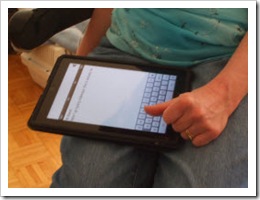
Glenda typing on the iPad with her left thumbWhile killing six hours at the O’Hare airport, I discovered that holding the iPad in the portrait position yet sideways on my lap with the small-sized keyboard parallel with my thigh, I could guide my hand along my thigh and type with my left thumb. My typing speed and accuracy was surprising; I’m curious to test if my typing speed is any faster on the iPad – that’s another post. Although I do envision myself sitting out on the deck, on the couch or comfy in bed, writing.

Then, I did something I had never done before: I went into one of the many Starbucks at O’Hare and ordered my first mocha frappuccino by myself. No misunderstanding or hand gesturing involved. It was so cool, like another door had just opened for me!

I feel like technology is finally catching up with what I truly need.


To keep up with my adventures, musings and insights, sign up to receive my future posts via email.

If you enjoyed this post, consider buying me a chai tea latte. Thanks kindly.
Related Posts

Random Highlights from Chicago Trip and Beyond

Filed under: Blogging,Living with a disability,Social Media — by at 10:36 pm on Wednesday, May 12, 2010

Late last Thursday night I finally made it home after a good yet long week away in Chicago and then Fort Wayne, Indiana. Since getting home, things have been crazy; four trips to Toronto and one to Virginia are in my near future.

Here are a few random highlights while I finish unpacking my brain (before I need to repack it):

I did manage to score an iPad while in Chicago! A full review is coming soon. For now, I will say that, for me, the iPad works great as a communication device! In fact, it is life changing. The butterfly emerges a little bit further from her cocoon of silence.

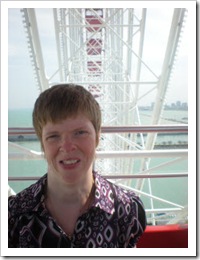
Glenda Watson Hyatt riding the ferris wheelKaren Putz, Amy Derby and I braved Chicago’s winds and rode the Ferris wheel at Navy Pier. With the seats enclosed like a gondola, being 150 feet in the air was not an issue. Being that high was a great vantage point for my first glimpse of one of the Great Lakes. My brand new iPad definitely aided in communicating with this duo, one of which is Deaf and the other is hearing impaired. Despite our three barriers in communicating, we had no shortage of topics to talk about!

Unfortunately, the anticipated karoke duet with Chris Brogan did not happen due to an accessibility issue. That story will be forthcoming. Nothing bad happens to bloggers; it’s all material!

I also attended this small event called SOBCon! I will share my takeaway lessons in yet another post. However, for me, SOBCon is more about interacting with the fellow attendees and friends rather than about the presentations, and having the iPad further deepened that interaction.

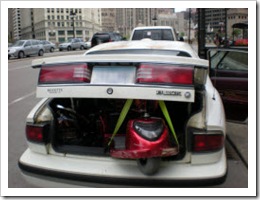
Glenda's scooter loaded in car trunkSunday, after the last SOBCon session and a quick trip to Batman’s bathroom (without incident this year!), my electric scooter was wrestled into the trunk of car. Oftentimes, what counts as accessible transportation is solely determined by the strength of the desire to get from Point A to Point B. Whatever works!

Deb Brown, Becky McCray and I were off to Fort Wayne, Indiana, for a private retreat kindly hosted by Jon Swanson at his church. Paul Merrill also joined us.

Jon Swanson, Deb Brown, Becky McCray, Paul Merrill and Glenda Watson Hyatt gathered in Jon's office
(Photo credit: from Jon Swanson’s Flickr photostream)

A box of chocolate on the bed

The retreat was a time for brainstorming, sharing, asking questions and regaining focus – intense, amazing focus! And great friendships – all a result of blogging and Twitter. There was also time for teaching Glenda-ish, learning lemur calls and sipping first margaritas – critical skills when running a small business! And, of course, chocolate was also involved. A big thanks to Becky, Deb, Paul, Jon and Nancy Swanson.

That’s my week in a nutshell. How was your week?

Technorati Tags: ,,

If you enjoyed this post, consider buying me a chai tea latte. Thanks kindly.
Related Posts

« Previous PageNext Page »