Glenda Watson Hyatt shares her
experiences living with cerebral palsy to
motivate and inspire others to think about
how they perceive their own situation and
their own world around them. She does all
this by typing with only her left thumb!
Read Glenda's Book - available in paperback and on the Kindle!
Saturday night is a mega high school reunion for the schools in North Delta. Can you believe I graduated from high school twenty-five years ago this September? I can’t!
I am very tempted to go, but I’m also somewhat hesitant. Being the only one with a significant physical disability…which I really didn’t mind…it was my corner…everyone knew me, but not many really knew me. Only a small handful of close friends understood Glenda-ish.
Conversations at previous reunions went something like “Hey Glenda! Great seeing you! You’re looking good.â€.…then they moved onto the next vaguely familiar face.
Is it possible the iPad could help me take conversations beyond the superficial at this reunion? Is it possible my high school classmates could finally get to know me beyond my letter grades – and vice versa? Is it possible using the iPad for communication could make my high school reunion bearable, even enjoyable? Is it worth going to the reunion to find out?
Will I spend a quiet evening at home, wondering what I’m missing but saving myself from revisiting the past…or will I don my favourite purple blouse, grab my iPad and catch the bus to Scottsdale – in the name of this blogger doing research for another blog post? I’m still undecided.
Just breathe? Do you know how comforting those words are not? With my cerebral palsy, when my body hears those words,the opposite happens: the act of putting focus and effort into breathing causes muscles to tighten – the result least desired in that moment.
And yet, do you know how many times I’ve been told to “just breathe”? I might as well be told to “just walk it off”. Both are as equally likely.
Reading September’s issue of O Magazine the other night, I finally found an alternative that might actually work:
“If you are too upset to focus on your breath [it’s not that I’m too upset, but anyway…], try describing your surroundings in detail: Notice the shades, lines, colours and shadows in a painting, or the view out of the window — anything to pull your attention to external things.”
Yes! Shifting my focus from internally to externally might be enough to trick this body into doing what I need it to do in that moment.
Now…to remember, for me, “just breathe” means “stare out the window”…
One perk by being a blogger is that I am receiving more and more press releases, announcements and offers of review copies in my inbox. Most get deleted; the occasional one I accept.
One press release that recently landed in my inbox caught my eye. The headline read:
Did you know that September is National Menopause Awareness Month?
Followed by the staggering statistics:
Over 6,000 women enter menopause every day in the US alone and by 2015, the number of menopausal women is expected to reach 1.7 billion!
Next came an invitation to interview two of the principles of the new documentary Hot Flash Havoc (warning: music auto-starts!): Executive Producer Heidi Houston and Alan Altman, M.D., a Gynecologist specializing in menopause and midlife sexuality.
I began thinking, “Of those 1.7 billion menopausal women, a sizable number will have various disabilities of varying degrees. After having one doctor dismiss my question about hormones, here’s an opportunity to ask some tough questions about women with disabilities, hormones and menopause!â€
Rather than hitting the delete button, I replied and asked “whether the principles would be open to interview via email, discussing menopause and women with disabilities.†The response was resounding yes! Awesome!
So, I’d like to ask my readers, “What questions related to disabilities, hormones and menopause would you – women with disabilities or chronic illnesses, loved ones of women with disabilities, and enlightened men – like me to ask the Executive Producer and the Gynecologist?â€
Please leave your questions in the comment section below by Friday, September 3rd, 2010. Ask those burning questions, sisters!
Three weeks ago today I had the pleasure of presenting with web accessibility consultant and speaker Tom Babinszki on the panel “Living with a Disability in the Web 2.0 Era†at the Plain Talk Conference held in Alexandria, Virginia.
Here’s my PowerPoint presentation in video with the transcript below:
Before I begin I would like to thank you all for coming to a conference on communicating plainly and clearly. I find it interesting that I, who have found a compelling way to deliver presentation despite my significant speech impairment, have been asked to present at such a conference. This only proves that the communication method is secondary to the message.
I’d also like to mention that when some people are nervous their faces turn beet red, when I’m nervous my head bobs for apples. The fact that you cannot see the apples makes me question which one of us has the disability.
Living with a disability in this era of Web 2.0 technology is exciting, filled with opportunity. Technology is finally catching up to what I truly need. However, it has been a long road with several bumps and lessons learned along the way.
My typing career began at the tender age of five on a Smith Corona electric typewriter outfitted with a key guard to increase my likelihood of hitting only one key at a time. I glided my hand, in an ergonomically compromised position, along the top of the typewriter and typed with my left thumb.
Occupational therapists and other adults tried desperately to get me to type in other ways, but nothing worked as well or felt as natural as typing with my left thumb, which shows I’m the only expert in knowing how my body works best. I still own a Smith Corona to write cheques, fill out forms and make quick notes.
In Grade 9, my guidance counsellor suggested I learn to use computers as they would likely benefit to me later. That was the wisest advice I received from any counsellor, ever. That year I started on an Apple IIe and learned AppleSoft Basic from a Grade 12 student during one of my study periods. In later grades a computer in the Learning Centre was made available to me for doing assignments, which eliminated the necessity to retype “good†copies of papers — a significant timesaver for me.
On New Year’s Day, 1988, I headed off to university with a Commodore 64 generously donated by two local Lions Clubs. This computer, and a subsequent, updated 286 were terrific tools that enabled me to complete my university papers and exams and begin to connect with the outside world in a technologically new, yet very ordinary way: via email and bulletin board systems.
But my computing life didn’t begin in earnest until I met Darrell my geek husband -his words, not mine! Together we worked out, and continue to discover, computer access methods that work best for me.
As an example, we replaced the mouse with a sturdy joystick. This affords me better control of the pointer, despite my jerky hand movements.
We then added the software program E Z Keys. To save time and effort while typing I currently use the features:
word prediction and completion, where numbered words are suggested dynamically as I type;
abbreviation expansion, where I type a couple of letters that automatically expand to phrases or complete sentences;
and automatic spaces, which are set to occur after punctuation.
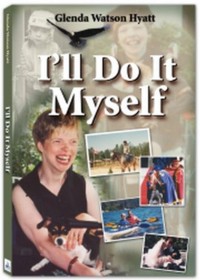
When typing with only one thumb at ten words per minute, I need to be as efficient as possible. Even with this technology, writing my autobiography, I’ll Do It Myself, took me four years.
Keyboards without extra function keys or buttons across the top – that’s where I glide my hand – are becoming more difficult to find. And, invariably, one or two keys get gummed up, making the entire keyboard useless. (I require a lot of good dark chocolate when software is thwarting my best efforts!) I recently switched to a basic flexible, washable silicon keyboard without any extra buttons. The best thing about this fantastic assistive technology is that it isn’t AT, which means it isn’t outrageously priced. It cost 15 bucks at Staples!
Another cool piece of software I use frequently is TextAloud. Using this text-to-speech software with the synthesized voice of “Kateâ€, I am now able to give interviews, narrate videos as I please and make presentations such as this one. I dream of one day having a voice created using digital sampling of my and my family members’ voices and inflections to make my voice less Kate and more Glenda.
My foray into Web 2.0 began five years ago when I discovered blogging. I am not exaggerating, it changed my life forever. For the first time, I spoke with a clear, concise voice and could communicate with the world completely unhindered by my disability. Suddenly people were getting to know me – my thoughts, my opinions, my experiences – without being presented with my disability first. That isn’t to say I hide my disability, I am very open about my cerebral palsy on my blog. But my blog readers and friends get to know me before and beyond my cp. They call me the Left Thumb Blogger.
To highlight the change, I’d like to share a story: several years ago I attended a disability management conference. I was sitting in a room of 400 human resource managers, there to learn about employing people with disabilities, and I happened to be looking for a job. You’d think it would have been a room filled with opportunities, yet I have never felt so alone. No one spoke to me; no one interacted with me. My disability – or, moreover, my perceived disability – was the barrier.
Contrast that experience with this: I attend blogging and social media conferences – like BlogWorld in Las Vegas every October – and that uncomfortable, awkwardness about how to react to my jerky movements and my difficult-to-understand speech does not exist. Because I already have made online connections, relationships based on equal intellect and mutual respect, people already know there’s much more to me than my cp. Online introductions help bypass that awkward stage.
I work as a web accessibility consultant with three levels of government, transit authorities and non-profit organizations to improve accessibility of their websites for people with disabilities. I am sought after to assess website accessibility and suggest improvements. I write about accessibility issues on my blog Doitmyselfblog.com, give presentations and teach an online course to bloggers, enabling them to create more accessible content and, thus, increase their readership.
I also use Twitter and Facebook to connect with colleagues, friends and family. I prefer Twitter because tweets are limited to 140 characters — my left thumb keeps up quite nicely. It has become my water cooler. I work from home, but I no longer feel I’m working in a vacuum. There’s always someone around who asks or answers a question, offers or needs an encouraging word or shares a laugh with me regardless of whether I’m working through the day or night.
Like most discerning web users, I tend to avoid or spend less time on sites that are overwhelming. Instead I prefer those with clean, crisp design. For example, I prefer MyAlltop to Google Reader to follow the various blogs I read. Google Reader was hard to maintain with more articles added daily. MyAlltop – a simpler, cleaner reader that maintains the list at 5 articles per blog followed, adding new articles and dropping previous ones without action on my part to keep it manageable.
Other things I personally avoid or struggle with online include:
Search features like the one found on the official website for Americans with Disabilities Act, which involved a whopping four pages to complete a search. I might as well use Google — even if I have to scroll to find the appropriate link, it’s much less arduous than the endless clicking.
Tiny clickable areas can be difficult for me to click on.
Fly out menus are tricky to click on before vanishing and I typically click on a link I didn’t intend to go.
Auto-start audio or video cause me to jump out of my skin.
A new challenge has popped up in recent months that sends my frustration through the roof: My assistive technology is not keeping up with new web technology. An example: I have started using Google Wave – an online collaboration tool – to collaborate, brainstorm and stay connected with a networking group. The conflict between Google Wave and my E Z Keys word prediction is causing two or three words to be typed when I enter an appropriate number, forcing me to backspace to delete unwanted words.
To avoid this, I can also type my message in Notepad and then paste it into Wave, but really, both options are more time consuming and less efficient than properly functioning software, and particularly frustrating during the collaborative process.
I recently purchased my latest acquisition in Chicago – an iPad. This is more than the latest, hottest toy to me. In the short time I’ve had it, my life has changed yet again. I bought it to try the communication app Proloquo2Go, and used it as my communication device of choice that first day I had it, both at the social media conference, and afterward, hanging out with friends at the bar! My iPad takes conversation to a deeper level than was ever imaginable when using standard, low-tech alphabet cards to get a point across.
The iPad, pricey to the average person, is available at a fraction of the cost of a single-purpose augmentative communication device. An easy method of communication is so important to my inclusion in society. It also allows me to tweet, check email, write blog posts and read while I am out and about, away from my computer. My iPad is a Blackberry or iPhone in a size I can easily use.
I was asked to look toward the future, and tell you of a technology I might wish for. A dream I have had since I was ten is a computer that reads my thoughts, with every word appearing onscreen. There has been some advancement in the brain research and relevant technology, hopefully it is realized well before my left thumb needs to retire due to debilitating arthritis. One can dream…
If I may offer one final suggestion: learn about your clients, your colleagues, your patients with disabilities, go read their blogs. Spend time getting to know the people you serve and work with beyond their disabilities and it will likely change you. The opportunity is there, like never before. Use it.
To offer you a starting point, today I have published a post on my blog that lists several of my favourite blog posts and some of the bloggers with disabilities or with loved ones with disabilities whom I follow. I invite you to stop by, to read and to experience.
After another scorching day here in Surrey, I am enjoying the coolness of the evening on my deck…with my iPad.
Oftentimes I’ve been tempted to bring my laptop out here to write; to see if being outside changed my writing in any way. But the mere thought of unzipping tbs case, pulling out the laptop and flexible keyboard, plugging in the power cord because the battery was likely dead from non-use and waiting for Windows to load squashed any temptation! The Muse was silenced.
Using my iPad out here is way easier: turn it on, tap the WordPress app and I’m ready to go. My iPad is more of a laptop than my laptop ever was.
The one thing that would be helpful is if the finger-spreading motion increased the font size in this app. Perhaps I need to explore the settings more. Another time…the Mosquitos have discovered my sweet blood.
Good night. Sweet dreams and blessings for tomorrow.
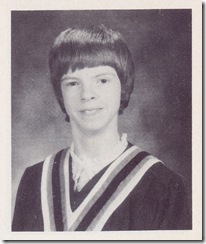 Saturday night is a mega high school reunion for the schools in North Delta. Can you believe I graduated from high school twenty-five years ago this September? I can’t!
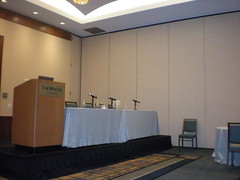 Three weeks ago today I had the pleasure of presenting with
  Receive blog updates via
email
Receive blog updates via
email Subscribe via RSS


