
My Next iPad Experiment: Using Proloquo2Go to Conduct Interviews
I’m frantically working on my two presentations:
- “The Untapped iPad Market: Is Your Site POUR?“ for March 13th at South by Southwest (SXSW) Conference in Austin, and
- “The New AAC (Assistive and Augmentative Communication): Cheap and Disruptive?†for March 17th at the 26th Annual International Technology & Persons with Disabilities Conference (CSUN) in San Diego.
i am really looking forward to both conferences because, after working in the web accessibility field for thirteen years, I am finally going to meet many of my mentors, colleagues and possibly even competitors. I’m looking forward to soaking up even more of their expertise, and to sharing latest best practices, techniques and frustrations.
Amidst drafting the presentations and preparing for my trip, I began wondering how I could possibly capture some of this knowledge, expertise and insights to share with my Blog Accessibility readers.
An idea struck…
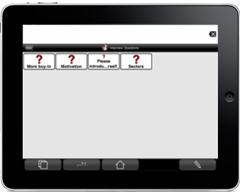 In the Proloquo2Go app, I have prepared various interview questions, which will enable me pick and choose which questions to ask (via text-to-speech) during the interview. And…I could record the interview using the movie setting on my camera, mounted on my scooter using the Gorilla tripod.
The result may not be a smooth flowing conversation, but rather a bumpy Q&A session. But that’s okay, right?
What’s amazing isn’t the technology to do it; it’s the confidence to try it. I wouldn’t have felt confident to give this a try a few years ago; I’m definitely on some kind of journey…final destination still unknown.
Will this iPad experiment work? Stay tuned…
If you enjoyed this post, consider buying me a chai tea latte. Thanks kindly.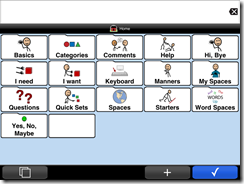 I have mastered using the typing option in the assistive and augmentative communication (AAC ) app Proloque2Go, which I shared in
 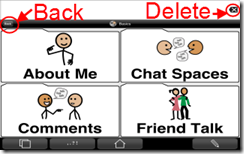 The size of icon buttons can be set from Ultra Small to Extreme, depending upon the individual’s motor skills. Yet, the size of the Back and Delete buttons can not be adjusted from their fairly small size, making it difficult for some individuals to use accurately. Some times I had hit the Delete buttons several times to get it.
 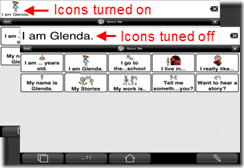 The icons can be turned off from being displayed in the Message box, which was a relief to discover. If my message contained childish pictographs, individuals unfamiliar with me and my abilities might interpret my cognitive abilities to be less than what they are.
 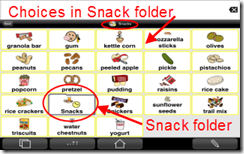 One thing I found confusing was the occasional endless loop; for example, listed within the Snack folder was a Snack folder icon. I didn’t try deleting it in case I messed up something. I’m not sure if its a bug or if the folder serves another purpose.
 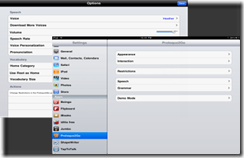 Another point of confusion for me was how the customization settings are split between settings in the app and the iPad settings. No doubt there’s a reason for this split, but I found flipping between the app Options and the Settings annoying. Perhaps once the Appearance, Interaction, Restrictions and such are set to meet the individual’s needs, then they do not need to be modified as often as the settings in the app itself.









 Receive blog updates via
email
Receive blog updates via
email Subscribe via RSS


