Do It Myself Blog – Glenda Watson Hyatt

Motivational Speaker

The iPad: A Cool Communicator on the Go

Filed under: Living with a disability — by at 7:02 pm on Friday, April 1, 2011

Originally published in the American Speech-Language-Hearing Association’s (ASHA) Perspectives on Augmentative and Alternative Communication, 20(1), 24-27 (paid subscription required for full access), here’s a brief history of my foray into augmentative and assistive communication (AAC).

Abstract

Glenda Watson Hyatt, web accessibility consultant, blogger, and user of AAC, shares her perspective on new mobile AAC technologies. A history of Glenda’s use of AAC is chronicled from her early low-tech strategies to her recent embracing of new mobile AAC technologies. She recounts purchasing an iPad and her early experiences attempting to use it as an AAC system in a variety of contexts. Strengths, weaknesses, and projections for the future are highlighted in this personal sharing of a user perspective.

A lack of oxygen for 6 minutes at birth resulted in the diagnosis “cerebral palsy athetoid quadriplegic.” My physical movements are jerky and involuntary; one body part or another is in constant motion. My left hand has some function, while my right is generally in a tightly clenched fist. I am not able to walk without support. My head control is tenuous, and swallowing takes a conscious effort.

“Functionally non-verbal” was also included in my diagnosis. It wasn’t that I couldn’t or didn’t communicate verbally, I did and do. My husband will attest to that fact, particularly when I’m fired up about something. It was the individuals beyond my family who didn’t understand what I was saying, as was evident early in my life, when in preschool a psychologist administered the Peabody Vocabulary Picture Test. I uttered one response that he could not understand. Finally, in complete desperation, he called in Mom, who was observing from the next room, to decipher what I was saying. “Roo roo.” The two of them gazed at the picture of a chicken. “Roo roo.” Suddenly it dawned on Mom. She asked, “Glenda, do you mean rooster?” Yes! The picture was obviously a rooster; the bird had a big, red comb. The experts expected me to offer the accepted response, chicken.

I learned to be quiet, except around my family and close friends. One day I came home from kindergarten nearly in tears. “Mommy, my knees hurt.” She sat me down and looked at my long-legged braces. The occupational therapist had put them on the wrong legs! Wearing shoes on the wrong feet causes some discomfort, but wearing heavy, metal braces on the wrong legs hurts. I knew he was putting the wrong brace on the wrong leg. However, I kept quiet because I thought he wouldn’t understand what I was saying. I didn’t want to create a hassle as he tried to decipher what I was telling him. After all, only people close to me understood Glenda-ish.

During my school years, there was an occasional attempt to introduce me to communication devices, which were quite primitive back then. I wasn’t interested. I felt those clumsy-looking “voice boxes” were more difficult to understand than I was. I was scared people would stop trying to understand me when I did talk. I didn’t want to be stopped from having my own voice being heard.

During my 7 years at university, my low-tech, no-batteries-required alphabet card became my security blanket. I didn’t leave my apartment without it. The alphabet card was handy for spelling out a word or two in a pinch and during lopsided conversations. My main form of communication was by notes I had typed beforehand, trying to anticipate all the information that would be needed in that particular conversation, which took some planning and forethought. I went through several dozen pads of Post-It notes during my university years. I dubbed them my talking papers.

Fast forward to 2005. I was active on the Social Planning and Research Council of British Columbia’s Board of Directors, and I was beginning to give presentations. The need for effective face-to-face communication was becoming more of an issue. I began wondering whether, with the advances in technologies, there was now a communication device that suited my needs. My husband Darrell called an old friend’s father who was the sales representative for a few communication devices, which he brought by our home for me to see. Despite the lure of the “shiny new objects,” I wasn’t overly sold on the fact that they were single-purpose devices, which would mean something else to lug around with me. And the price tags, ranging between $4,500 and $8,500, were definitely prohibitive.

I decided to go with a small Libretto laptop for roughly half (or less) of the price and with much more functionality than a communication device. I used it to take notes at conferences, to give several presentations, and to participate in some group discussions using the free text-to-speech software, E-triloquist.

I had some communication success with the Libretto and adding a $15 roll-up keyboard made typing easier. However, despite its small size, using it for spontaneous communication was clumsy. I had to unzip the laptop case, undo the Velcro straps, pull out the laptop, place it on a horizontal surface, boot it, and run the desired software before I could type out what I wanted to say. By then, the conversation had progressed and my contribution was old and disjointed. The laptop, although useful for some purposes, wasn’t really convenient for communication in the way I needed it to be. The Libretto did enable me to communicate a bit more, but it still wasn’t the ideal solution for me.

Fast forward again to April 2010. While in Chicago for a conference, I found my way to the Apple store and, after playing with an iPad for an hour, I pulled out my Visa to buy one, a month before the device was available in Canada. I also bought the Proloquo2Go (Assistiveware, 2009) app. Leaving the store, I had an intense feeling of buyer’s remorse. Would I be able to use the touch screen reliably with my shaky and jerky movements? Would the iPad really work for communication? Would it be another fad “shiny object” to gather dust? Had I just put $1,217.40 USD on my Visa for nothing? My stomach was in knots as I headed back to the hotel.

My buyer’s remorse was short-lived. After an hour of quality time with my iPad in my hotel room—enough time to unpack the thing, turn it on, and play around in Proloquo2Go and discover the onscreen keyboard and “speak” button—I met my two Deaf and hard-of-hearing friends for lunch. Typing in Proloquo2Go came in handy. A combination of lip reading, American Sign Language, and typing on the iPad, now there’s AAC on the fly!

Later that night, hanging out with other friends at the bar, the iPad’s back light and clear display made for easy reading in the dimly lit bar. The font size in the Proloquo2Go app was large enough to read from a comfortable distance.

The cool thing was, because the Holiday Inn and bar had WiFi, I had Internet access. When asked what I had been up to, I responded “problogging and ghost writing,” and I was able to show what I had written. I also shared the video of me ziplining across Robson Square in downtown Vancouver during the Winter Olympics. The iPad allowed for a deeper level of communication that would not have been possible with a single-function AAC device.

At another point during the conference, someone was having trouble figuring out what I was saying, and she asked, “Where’s your iPad?” In that moment, I felt a sense of normalcy and acceptance. Using my iPad, a Blackberry, or iPhone in a size I can actually use is not another thing that makes me different. It wasn’t using a strange, unfamiliar device to communicate with this group. People were drawn to it, because it was a “recognized” or “known” piece of technology, rather than being standoff-ish with an unknown communication device.

Even though the Proloquo2Go app has two options for communicating, the grid view and the onscreen keyboard, I see myself using the keyboard more where I have the freedom to use the words I use without needing to go hunting for them mid-conversation. For in-depth conversations, the grid option is too limiting and too much customization is needed to add the vocabulary that I use. Learning the organizational structure and memorizing where individual words are located to effectively communicate with this tool would require either training or several rainy Saturday afternoons curled up with my iPad.

What would be great is if the TextExpander (SmileOnMyMac LLC, 2010) app was compatible with the Proloquo2Go app. This could enable me to type something like “GH,” and it would automatically expand to “Glenda Watson Hyatt,” saving me time and not slowing down the conversation flow as much. A separate app would be better than an expansion feature within Proloque2Go, because then I could use the same shortcuts across apps on my iPad.

In addition to using the Proloquo2Go app, I have found other ways to use my iPad for communicating. Nominated for the local Entrepreneur of the Year’s High Tech Award, I needed to prepare a one-minute acceptance speech in the event of being announced as the finalist. Not eager to need to pull out my laptop, I wanted to be able to whip out my iPad for the quick task. I used my text-to-speech software TextAloud (NextUp Technologies, LLC, 2005) on my computer to create the audio file in the NeoSpeech voice of Kate, which I use in all of my presentations and which people have come to recognize as “my voice.” I then e-mailed it as an attachment to myself on my iPad. When I was announced as the winner, the Master of Ceremonies knelt beside me and held a microphone next to my iPad. I tapped play and Kate spoke my acceptance speech perfectly!

Being able to whip out my iPad from my handbag and having a choice of communication methods for when I’m on the go is life changing. Technology is finally catching up to my needs.

About the Author
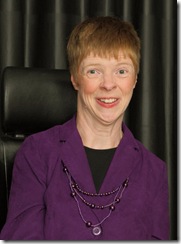
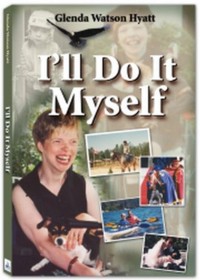
Glenda Watson Hyatt I work as a Web accessibility consultant with three levels of government, transit authorities, and non-profit organizations to improve accessibility of their websites for people with disabilities. I also combine Web accessibility expertise with a passion for blogging and first-hand experience living with a disability to work with bloggers to create an accessible blogosphere. Personally, I blog at Do It Myself Blog (www.doitmyselfblog.com) and Blog Accessibility (www.blogaccessibility.com). I have shared my life story in an autobiography titled I’ll Do It Myself (available from my blog and on the Amazon Kindle) to show others cerebral palsy is not a death sentence, but rather a life sentence.

References

Proloquo2Go. (2009). AssistiveWare [Software]. Available from http://www.apple.com/iphone/apps-foriphone/

TextExpander. (2010). SmileOnMyMac LLC [Software]. Available from http://smilesoftware.com/TextExpander/touch/

TextAloud. (2005). NextUp Technologies LLC [Software]. Available from http://www.nextup.com/index.html

If you enjoyed this post, consider buying me a chai tea latte. Thanks kindly.
Related Posts

The Foot as a Brake: Do Not Attempt This at Home

Filed under: Living with a disability — by at 5:43 pm on Saturday, March 26, 2011

Thursday afternoon I was finally preparing my outdoor scooter to go wheelchair square dancing that evening. Placing my purple travel bag on my lap with my left leg slightly straightened to balance the load, I headed down the hall to the bedroom.

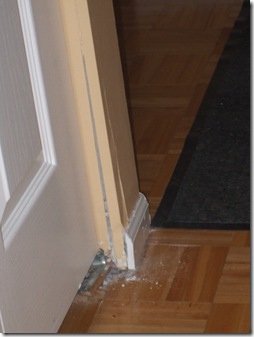
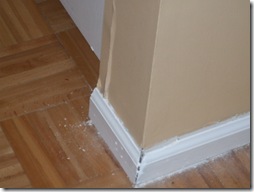
Wall damaged by foot Somehow the bag got caught in the scooter controls and I lost control of the scooter, which didn’t stop until my left foot impacted against the metal corner frame around the laundry closet. The bottom of my heel and ball of my foot hit the metal piece straight on at full force, damaging my foot and the wall.
The room spun briefly. Oh gracious me were not the words I uttered. I immediately knew it wasn’t good.

Cracked wall after impact with foot Darrell was out and, because he rarely has his cell phone on while out, I emailed and tweeted him to get home NOW. I also sent out a tweet asking if anyone local could call Sunrise Seniors Pavilion to have them send home my husband. (A big thank you to those who called and emailed the seniors’ centre for me!)

I grabbed an ice pack and put up my ballooning foot as high as I could. I didn’t dare remove my shoe; I figured the shoe would provide support and help to keep my foot still. With my athetoid cerebral palsy, pain causes my muscles to twitch, which causes more pain. It’s a vicious circle. Every time my foot twitched, I jumped through the roof.

Breathe. In. Out. It’s not life threatening. In. Out. I’ll be okay. Owww! Damn. Breathe.

Darrell came home and I explained what happened, in between gasps of pain. We formulated and reluctantly headed for Surrey Memorial’s Emergency.

After checking in and a fair wait without being triaged or registered, a nurse collected a few of us in the waiting room to “fast track" us. This is fast tracking?

A few patients and accompanying companions followed the nurse into the secured treatment area. The nurse indicated that Darrell would have to go back to the waiting room because there wasn’t room for two wheelchairs.

Darrell explained that I needed him for speech purposes. But, once he relayed how the injury occurred and other necessary medical details, he was told to leave. The nurse assured him that she would come get him if he was needed. None of the other companions were forced to leave.

In that moment I wondered what were my patient’s rights. Patients who are Deaf wouldn’t (or shouldn’t) be denied access to an interpreter. Non-English speaking patients requiring a translator would definitely not be denied a translator; that would hit the news for sure.

Yet, I, with a significant speech impairment, was denied my means of communication. Darrell did hand me my iPad before leaving, just in case, but I wasn’t sure I could coherently type because I was in so much pain. I sincerely hope the $700 million hospital expansion will have enough space to accommodate patients in wheelchairs and scooters.

After sitting there for a few minutes, I was sent back to the waiting room to register. I guess "fast tracking" doesn’t mean the most efficient; otherwise surely I would have registered before being lead to the secured treatment area. Right?

Once registered, I was told to proceed to the x-ray department. This time Darrell followed me, regardless of any objections. He explained to the technician that my foot may not stay still if my shoe was removed. Of course, both the shoe and sock had to come off. Holy momma! My ankle was about twice its normal size. Placing it any where near the x-ray film was excruciating painful; agony that had to be repeated from three angles. The technician then kindly replaced my sock and shoe. Holy frick!

Once back in the treatment area, the ER doctor examined my x-rays. I think my previous ankle stabilization surgery – triple arthrodesis – stumped him. Removing my shoe and sock again for a quick look, he asked whether it hurt. You went to medical school for how long to ask a brilliant question like that?

He said he didn’t see any breaks, but the radiologist would call on Friday if he saw any breaks. No news is good news.

The doctor told me to take 1-2 Extra Strength Tyenol every four hours and to use a warm pack, and sent me home. No word on what damaged had been done or what to watch for. And no questions about whether I would manage okay at home with only one good foot. Gotta love fast tracking.

My ankle is still hanging over my shoe, which I have yet to remove. And my foot still hurts like stink! I have mastered getting on and off toilet; the couch not quite, the bed – forget it.
I have no clue how long I will need to maintain the flamingo stance for; I am definitely building up other muscles though.

Thank you everyone for your tweets, Facebook messages and emails. I appreciate your support and well wishes.

If you enjoyed this post, consider buying me a chai tea latte. Thanks kindly.

Related Posts

The Inaccessible Nightmare Continues: Travel Stories from the Trenches

Filed under: Traveling with a Disability — by at 3:59 pm on Wednesday, March 23, 2011

Continuing with my saga about getting from Austin to San Diego via Phoenix last Tuesday…while waiting at the gate, after having my seat upgraded from “standby” to “confirmed” thanks to my travel agent, I overheard the reason for the delay was because the flight had to switch planes twice in Charlotte, North Carolina. Some things I can do without overhearing!

After a slight delay on the tarmac due to minor mechanical issues, we took off. The flight was uneventful until we landed. While being rolled off the plane like Hannibal Lecter, I immediately noticed one of my scooter’s rear view mirrors had been busted off and one of my Gorillapod’s legs amputated; the parts had been shoved in the pouch on the back of my chair. No apology or compensation for replacement parts were offered. At that point, I was more concerned with whether my scooter still worked. But, it did make me wonder whether the rough handling by US Airways ground crew also explained some of the mechanical issues experienced by the airline.

I next discovered the accommodation guaranteed in Austin had yet to be arranged for my unscheduled stop over in Phoenix. I waited about half an hour while Customer Service booked an accessible room and determined which voucher to use for a wheelchair taxi to and from the hotel.

Finally, at the Twin Palms Hotel, the first room was not accessible in the least, despite the wheelchair symbol on the door. There was no way I could get in the bathroom. The staff person took me to a second accessible room to try. Because there was more space to turn into the bathroom, I could get the front end of my scooter in far enough to get to the toilet. A shower was out of the question and, with only seven hours until the taxi picked me up, it wasn’t even a consideration. The room would do for the short night. But, had my husband been with me, the “handicapped room” (as listed under amenities on the hotel’s site) would have been too handicapped for him to use.

A “handicapped room” with a narrow door, no space beside the toilet to park a wheelchair, no grab bars and no way to get in the shower or tub is, indeed, handicapped; not accessible. The power outlet and light switch right beside the bed were nice features though.

Thankfully the taxi driver did return at 6am precisely. Even though the airline paid the taxi fare, I tipped him handsomely. He was one of the very few during the ordeal who cared.

Back at the Phoenix airport, I proceeded through security and onto my gate without incident. Breakfast consisted of a granola bar and a handful of dried apricots before boarding yet another plane.

My scooter arrived in San Diego in working condition and without any more superfluous parts missing. Bonus! And I waited only a few minutes for the accessible shuttle to the Holiday Inn. Double bonus! Things were looking up.

After checking in and quickly freshening up in my truly accessible room, I headed to the Elephant & Castle Restaurant for a lunch courtesy of my travel agent – an appreciated gesture for the inconvenience endured. Sitting on the patio on an early spring day and overlooking the harbour, I enjoyed chicken penne, eating at my own own pace, for the first time in a week. At one point, Rod Stewart even serenaded me over the speakers. I was feeling better.

I pulled out my sunglasses and exited the hotel. Turning right to the closest crosswalk, there was no curb cut in either direction. Are you kidding me? Lord have mercy, please!

Laughing and shaking my head in disbelief (or, perhaps, in complete belief given my trip so far), I pulled an 180 degree turn and found an accessible crosswalk in the other direction.

A pleasant walk part way around the harbour found me at the Manchester Hyatt ready for the 26th Annual International Technology & Persons with Disabilities Conference (CSUN).

That was the end of my noteworthy accessibility issues.  Even nightmares come to an end, eventually. 

Technorati Tags: ,,,

If you enjoyed this post, consider buying me a chai tea latte. Thanks kindly.

Related Posts

Traveling Nightmare: From the Trenches

Filed under: Living with a disability — by at 4:36 pm on Thursday, March 17, 2011

My trip to Austin and then San Diego has been filled with material for upcoming blog posts. Here is a collaborative recollection of one “adventure” I’ve had on this trip…and I maintained my finely worn Canuck politeness throughout it all…

BEWARE THE IDES OF MARCH!

Mary McDonald met Glenda on Tuesday (March 15th) at 11am in Austin  We had lunch at the motel, then we went for a  drive; the scooter tucked back in Glenda’s hotel room).  We got back to the hotel at 1 pm, and started to wait for her shuttle.  Turns out that’s when the fun started – the reservation for the shuttle was for February 15th, not March 15th.

We didn’t discover this mistake on her inbound, because Mary had ALSO made a reservation for me, and that was probably the record they had.   Although they had the confirmation number from the pre-paid reservation (which was for February 15th), they also had Mary’s, with the correct month. The shuttle service didn’t notice that it was a different confirmation number. Mary called the shuttle at 1:30, and we discovered the mistake. An accessible shuttle was ordered and they said it would be there by 2:10 – cutting it close for a 3:20 flight, but still doable.

Of course, the shuttle didn’t arrive on time and we loaded into the shuttle (Mary following in her little hybrid) at 2:40.  By the time Glenda arrived at the airport it was too late… so we started working on Plan B. 

The only flight Glenda could get on was the 6:44 pm – which was going to be delayed in Austin, causing her to miss the connection to San Diego, stranding her in Phoenix for the night.  We also looked at flying Southwest direct to San Diego but that was $388, and had no room on it to boot.

Mary got us both through security and we went to the Continental Presidents Lounge (Mary is a member) to sit, relax for 10 minutes, then start making phone calls.  Mary called the travel agent back home, Belinda, who was very apologetic, and basically took over for Mary. Belinda worked her magic and got Glenda confirmed seating and got US Airways to guarantee that she would be accommodated in Phoenix, and got on the phone with the Holiday Inn in San Diego to get them to cancel without penalty the pre-paid hotel room (but keep the reservation for the following nights), etc.

Mary also lodged a formal customer complaint with SuperShuttle in the hopes of getting a refund

We had pizza for dinner, Mary pre-opened several granola bars, cookies, and cheese for Glenda to access them easily, and Mary also kindly packed a great cheesy bagel and butter.
——-

I will continue sharing the saga once I’m home and have recovered from the trip from hell.

If you enjoyed this post, consider buying me a chai tea latte. Thanks kindly.

Random Posts

Upgrading to an iPad 2? Change a Life with Your Old iPad

Filed under: General — by at 6:37 pm on Wednesday, March 2, 2011

Since buying my iPad last April, I have shared many of my experiences and insights on how the device has impacted my life:

In preparing to my two upcoming presentations – “The Untapped iPad Market: Is Your Site POUR?“ on March 13th and “The New AAC (Assistive and Augmentative Communication): Cheap and Disruptive?” on March 17th – I have read numerous stories of how the iPad is changing the lives of others with disabilities.

Here are a few of the stories I will share in my presentation on March 13th:

Byron had a stroke, losing use of his right arm and right leg and his ability to speak. After using the iPad and Proloquo2Go – the same app I use – for only three days, he could express his food and drink choices, his name and address, and, more importantly, his personal needs – like needing to go to the bathroom and where he has pain. This minimizes frustration for both him and his wife Cindy as he is now clearly understood and she isn’t trying to second guess what he wants.

Leo is 9 years old with intense autism. His Mom explains, “He is not conversational, he learns very slowly, and he has been prone to violent outbursts.”

Leo had shown interest in the iPod Touch, but its 3.5-inch screen was difficult for his fingers to navigate. Within a month of his Mom winning an iPad, Leo had mastered apps designed to teach spelling, counting, drawing, making puzzles, remembering pictures, and more. The iPad has also been used to teach manners and to distract his attention prior to outbursts.

Leo can’t use a pen or pencil very well, because, like many autistic children, he has problems grasping small items. Before the iPad, his most advanced drawing was a smiley face with legs. Now, using the DrawFree app, there’s ears, hats, arms, fingers, and toes!

At 10am, April 5, 2010, an iPad landed on the desk of American Federation for the Blind’s technology associate Brad Hodges for him to review for an upcoming article. In his “24 Hours with the iPad”, he shares, “On that night, I purchased a book from a book store, exactly as my sighted neighbors and colleagues would. …I believe the advent of accessible iBooks will be viewed by future generations as one of the landmark events in the lives of the blind.”

If you are considering upgrading to an iPad 2, consider renewing  the life of your old one by passing it on to someone who could benefit by having an iPad, and, quite possibly change a life in the process.

Here are a few suggestions of where your iPad may be greatly received:

  • A family with a child with a disability: Even though the child may have a communication device at school, oftentimes the device cannot be brought home, leaving the child voiceless during non-school hours.
  • A special ed class for several children to use.
  • A rehab centre.
  • A day program for adults with disabilities.
  • An employment program for people with disabilities to aid with their job search. An iPad would have been so helpful when I went for job interviews. Perhaps I may have landed a job.
  • A friend or relative who has had stroke or other injury and who may benefit from using an iPad.

The possibilities are endless… Go with where your values are – whether it’s helping people with disabilities, people who are homeless or financially strapped, a struggling small business, a new  non-profit – and give your old iPad a new life, rather than leaving it to collect dust with those other gadgets that you’ve outgrown.

A big thanks goes to Jon Swanson for initiating this idea on Twitter earlier today!

If you enjoyed this post, consider buying me a chai tea latte. Thanks kindly.

Related Posts

« Previous PageNext Page »