Do It Myself Blog – Glenda Watson Hyatt

Motivational Speaker

What Does Accessibility Mean to You?
Filed under: Accessibility 100 — by at 3:11 pm on Thursday, January 21, 2010

Another Accessibility 100 postIn launching the 2010 edition of Accessibility 100 – a series of 100 easy-to-implement, free and inexpensive tips for improving accessibility for people with disabilities, I am borrowing a powerful idea from blogger extraordinaire Liz Strauss.

You are invited to share exactly 25 words on:

What does accessibility mean to you?

Why only 25 words? To drill down to the essence of what accessibility truly means.

As Liz explains (with a few minor changes),  “Here’s how you might go about it:

  1. Look for an insight or piece of wisdom about accessibility.
  2. Write a sentence about it.
  3. Count the words you have written.
  4. Edit the sentence until you have 25 words exactly. Notice how your idea changes as you edit and how your feelings change with each rewrite.
  5. Add a picture if you can.
  6. Post your 25 words on your blog (or in the comments below) by January 31st.
  7. Link back to this post or leave a link to your post in the comments section (or both to be sure!).  I don’t want to miss yours when I compile all of them. “

I will compile all of your words into some kind of creative PowerPoint video.

To ensure the project’s richness in perspectives, insights and wisdom, everyone – with or without a disability, impairment or adversity – is welcomed and encouraged to share. Are you in?


Accessibility 100 is a series of 100 easy-to-implement, free and inexpensive tips for improving accessibility for people with disabilities. This is a community project. Feel free to leave your comments, questions and ideas for future Accessibility 100 posts.

Get the entire series by subscribing to this blog by filling in the form in the upper right corner or by subscribing to the RSS feed.

If you enjoyed this post, consider buying me a chai tea latte. Thanks kindly.
Random Posts

Top 10 Most Engaging Posts of 2009

Filed under: Blogging,Social Media — by at 1:30 pm on Tuesday, January 19, 2010

According to PostRank Analytics – a system for analyzing and scoring engagement events, social engagement refers to “the attention other people pay to your published content, like blog posts, news and articles. They see and read a post, and then because it’s interesting, inspiring, or controversial, they get “hooked” and decide to take further action.”

PostRank’s scoring system measures the “5 C’s” of engagement:

  • Creating: i.e. writing a blog post
  • Critiquing: i.e. leaving a blog comment
  • Chatting: i.e sharing and discussing information on Twitter
  • Collecting: i.e. submitting a post to Stumbleupon
  • Clicking:i.e. clicking a link to read a blog post

The more engagement an event requires (i.e. writing a blog post), the more engagement points the event receives. Bloggers can use their posts’ engagement scores as a measurement of how well their readers are reacting to and engaging with their content.

PostRank crunched the numbers to determine the most engaged readers in 2009. And the results are in…!

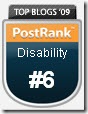
PostRank Top Blogs 2009 - #6 in Disability Thanks to you, my very engaged readers, Do It Myself Blog ranked #6 in the Disability category! Thank you!

The detailed analysis is available from PostRank. The top 10 engaging posts are:

  1. Da Wife on Wheels Dismissed Yet Again / August 29, 2009 – 406 engagement points
  2. 5 Reasons Why Bloggers and Web Designers Should Consider Accessibility / October 6, 2009 – 346 points
  3. Let’s Feed 100 People in Need Christmas Dinner, Again! / December 4, 2009 – 335 points
  4. WordPress Misses the #1 Accessibility Tip / September 28, 2009 – 325 points
  5. What Makes a Blog Theme Accessible? / August 6, 2009 – 274 points
  6. To the Employers Who Refused Me a Job, You Lose! / December 30, 2009 – 273 points
  7. Social Media Empowers Otherwise Silenced Voices / July 31, 2009 – 251 points
  8. How POUR is Your Blog / May 1, 2009 – 222 points
  9. Dreams Do Come True – With a Little Help from Friends / October 23, 2009 –164 points
  10. Are Multiple Themes Useful in Improving Blog Accessibility? / August 24, 2009 – 164 points

I’ve included the post dates to illustrate that the older posts (hence more time for engagement) are not necessarily ranked higher. These numbers also prove your comments, tweets, stumbles and the like do matter! Thank you.

I will continue creating, if you continue critiquing, chatting, collecting and clicking. Together, let’s see how engaged we can be in 2010!

Technorati Tags:

If you enjoyed this post, consider buying me a chai tea latte. Thanks kindly.

Random Posts

Are All Video Captions Equally Accessible?

Filed under: Blog Accessibility — by at 5:45 pm on Thursday, January 14, 2010

While writing my latest post for dotgov.com on captioning videos, I had the opportunity to learn a bit more about captioning YouTube videos. I began wondering if how I caption videos is the most accessible way of doing it. Allow me to explain.

When I create a PowerPoint presentation, I also include captions. This means when I capture the presentation as a video, the captions are already there, as in this video on accessible recreation:

Similarly, when I record a video, I use the captioning feature in Camtasia Studios 6, which is fairly easy to do. Captions are automatically added below the video, as in this video message:

This way the captions are always visible, not only for individuals who require them but also to be subtle accessibility reminder to others that videos need to be captioned.

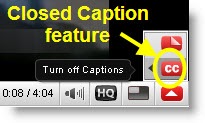
YouTube closed caption button By having the captions always visible – open captions, it saves toggling on captions in YouTube, if, indeed, captions do exist.
How many people even know the arrow in the lower right corner of the YouTube can turn on/off captions when captions are available? Go watch this great video of the WCAG (Web Content Accessibility Guidelines 2.0) Theme Song with the captions turned on. Can the caption feature be operated only using the keyboard? I am still digging for that answer…

Interestingly, if the captions happen to be turned off when I grab the code to add the video to this post, the captions button is no longer available (unless something changes after this post is live), making the captions unavailable to my readers. Really?

My embedded captions are always available, regardless where the video is viewed!

Because of the way I create captions, they are part of the video when I upload to Viddler or YouTube. I do not need to upload and edit a separate captions file. However it does mean when viewers search YouTube for captioned videos, mine are not listed.

Apparently when captions are uploaded separately to YouTube, they can be automatically translated into the viewer’s preferred language, and hence the videos become accessible to a larger audience. I am still looking for an example to verify how this actually works. My captions cannot be instantly translated.

Also, captions, being text, can be searched for, further increasing findability and accessibility. Captions created through PowerPoint and Camtasia cannot be searched via YouTube. 

Finally, when turning on captions in a YouTube video, you can control the look of captions with a few keyboard shortcuts:

  • Increase text size: press "+" key
  • Decrease text size: press "-" key
  • Change background: press "B" or "b" key

My embedded captions are always white text on a black background to maximize contrast and to enhance readability. However, short of watching the video in full screen mode, the viewer has no control over the font size. In future videos I can, however, increase the font size when creating the captions in PowerPoint and Camtasia, if this is an issue.

After this experimenting, I’m left wondering: are some video captions more accessible than others? What is the most accessible method of captioning video?

Share your thoughts and opinions in the comment box below…

If you enjoyed this post, consider buying me a chai tea latte. Thanks kindly.

Related Posts

Wheelchair Wraps: A Crazy Idea or the Next Advertising Trend?

Filed under: Living with a disability,Work — by at 9:32 pm on Monday, January 11, 2010

Coming home the other day, I noticed a parked car with several large stickers; quite possibly advertising. That got me thinking…

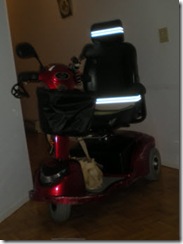
Front view of Comet scooter Why not paid advertising on my mobility scooter?
People tend to look my direction when I drive by, so why not put something in front of their eyeballs? And earn money while doing it?

Seriously.

Advertisers wrap cars, buses, trucks, and segways. Why not scooters and wheelchairs?

Here’s the benefits, as I see them:

  • People look anyway. Give them a message to look at.
  • Advertising on a scooter/wheelchair is unexpected and would catch attention.
  • I can go where cars, buses and trucks can’t.
  • No other advertisers are currently advertising in that way or in that space.

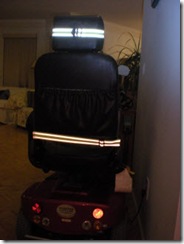
Back view of Comet scooter Looking at my scooter, I see two potential places for advertising really are visible:
  1. The basket on the front (shown in the photo above). This way the basket can easily be removed for situations when advertising would not be appropriate.
  2. The back of my chair. This place would not interfere with my use of the scooter or in photos.

Interested? Contact me to discuss this opportunity before someone else does! Seriously!

If you enjoyed this post, consider buying me a chai tea latte. Thanks kindly.

Related Posts

How Blogging Increases My Confidence

Filed under: Blogging,Motivation — by at 12:12 am on Saturday, January 9, 2010

Blogging has unquestionably increased my confidence when interacting with people face-to-face; particularly when meeting people from the blogosphere.

A bold statement, I realize. And how can it be when blogging entails spending hour upon hour at computer, typically alone? I began thinking what confidence really means.

The Oxford Dictionary offers these definitions:

1 firm trust (have confidence in his ability). 2a a feeling of reliance or certainty b a sense of self-reliance; boldness.

But, in my mind, something was missing. That’s a dictionary definition, but what does confidence really mean, at least to me? Then it struck me in simplicity and clarity:

Confidence is a sense of familiarity.

Allow me to explain how I rationalized this myself and see if it makes sense to you too:

By sharing my experiences, opinions and ideas on my blog and by leaving comments on others’ blog, people get to know me beyond my cerebral palsy or even before the cerebral palsy. Likewise, I get to know them through their written words. Hence, when we have the opportunity to meet in-person, there’s familiarity. They already know there’s more to me than my difficult-to-understand speech and my jerky movements, and, for the most part, we can bypass the initial awkwardness and carry our online relationship into the real world. And, from that, I gain confidence in my ability to approach people.

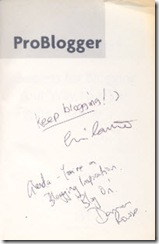
That confidence has led me to do things that I may not have otherwise. For example, I had been wanting to have my dog-eared and sun-faded copy of ProBlogger: Secrets for Blogging Your Way to a Six-Figure Income autographed by its two authors Chris Garrett and Darren Rowse – both top-notched and well-respected bloggers in the blogosphere. They are what I’ll like to be when I become a grown-up blogger.

ProBlogger book autographed by Chris Garrett and Darren RowseLast year, after giving my rockin’ presentation at SOBCon, Chris was still seated at his table without a crowd around him. Taking a deep breath, I wheeled over and handed him the book. He kindly obliged.

At BlogWorld, with my presentation following Chris’s and Darren’s panel, I thought I’d have the perfect opportunity to ask Darren for his autograph. Unfortunately, the crowd wanting to ask them questions was too large; I had to get up on stage and set up for my presentation. I missed my opportunity and disappointedly thought I might not another chance to meet up with the Aussie blogger.

Then, while waiting for the last keynote to begin, I spotted Darren sitting in the last row across the aisle from where I was. Now was my chance! Pulling out the book from overstuffed laptop bag and taking another deep breath, I wheeled over and tapped him on his shoulder. Not sure he knew me from blogger Eve, I was surprised he knew who I was and that he apologized for missing my presentation. He also kindly obliged.

Thank you, Chris and Darren. Without blogging, I doubt I would have had the confidence to approach two industry leaders.

What does confidence mean to you? What might you accomplish in 2010 if you had the confidence?

If you enjoyed this post, consider buying me a chai tea latte. Thanks kindly.

Related Posts

« Previous PageNext Page »