
Do It Myself Blog – Glenda Watson Hyatt

Motivational Speaker

Celebrating Thanksgiving Vegas-Style!

Filed under: Blogging — by at 4:00 pm on Monday, October 12, 2009

Hey everyone, by the time you see this, Darrell and I should be safely in Las Vegas, God willing, for our one and only holiday this year, and, of course, for BlogWorld Expo.

Just a reminder, with Jane Wells (appearing via video) and Damien Patton, we’ll be presenting “Three Faces of Blog Accessibility” at WordCamp Las Vegas at the BlogWorld & New Media Expo.

When: Saturday, October 17th, 2009, at 1pm
Where: Las Vegas Convention Center, towards the back of the Exhibit Hall

If you’ll be there, please join us. If not, the WordCamp sessions will be recorded and submitted to WordPress.tv the following week. I’ll post the link.

Last but definitely not least, I’d like to wish my Canadian readers and friends a very Happy Thanksgiving. It has been a tough year for many, but we are all still here!

I’d like to thank you all for your continued support, friendship and for making this blogging thing so rewarding and fulfilling. I am truly grateful. Thank you.

Happy Thanksgiving!

If you enjoyed this post, consider buying me a chai tea latte. Thanks kindly.

Related Posts

Life’s Most Important Lessons Aren’t Learned in the Classroom

Filed under: I'll Do It Myself: The Book,Living with a disability — by at 7:09 pm on Thursday, October 8, 2009

From Special Ed Classroom to University GraduateDuring my elementary school years, I was fortunate that I didn’t face name-calling, teasing and bullying like many other kids with disabilities do at school. However, there was one incident that cut me to my core.

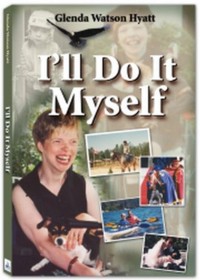
As I share in my autobiography I’ll Do It Myself:

Mom taught at my elementary school, so she would pick me up from my classroom at the end of the day and carry me out to the van at the front of the school; the school wheelchair stayed at school. One day, Mom had to stop at the office on our way out. She sat me down on the floor in the hall next to the gym doors at the main entrance. She would be only a couple of minutes, and I wasn’t in the way as people were leaving.

One boy, a year or two older than me, walked by and asked, “Are you retarded?” and then kept walking. I didn’t know what to say, and if I had said anything, my speech would have added fuel to the fire and would have confirmed his assumption. I said nothing.

Once Mom put me into the van, I burst into tears. When I managed to stop crying enough to communicate what had happened, Mom was sympathetic. She attempted to make light of it like she usually does, suggesting that next time I reply with something like, “No, are you?” – as if I could get that out clearly enough for it to be effective.

The incident was soon brushed off and forgotten – on the outside; but it wasn’t forgotten on the inside. That question hurt me to my core for a long, long time. Even though I knew I wasn’t retarded, I realized that others did see me as something I’m not. Since that day, I’ve been trying hard to prove to others that I’m not retarded.

Having reflected upon this over the years, I now see two issues here; the first being the word “retarded”. Several kids from the then Woodlands Institution were bussed to our school; many of them had mental retardation, as the disability was called back then. Looking back, I have no doubt that the boy meant no harm or ill-will. He asked a simple question. But, for me, “retarded” was a loaded word; it hurt, it degraded, it stung. Because of the use of the word through history, for many people with disabilities, being called retarded is as hurtful and demeaning as calling an African-American the n-word.

Ideally the word would vanish from our language. But, considering how pervasive the word is (how often do you hear someone utter something like “that is retarded” or “what a retard”?), the word vanishing is not realistic, unfortunately. The next best option is to disempower the word for those who are negatively affected by it. The word has power only if we allow it to. I’m still sorting through how exactly do to that, which might make for a lively discussion in the comments below or a topic for a future post.

The second issue stemming from the incident was that my feelings weren’t acknowledged. A joke was quickly made and then the matter was brushed aside. No doubt that was easiest in that moment. When I’m upset and crying, Glenda-ish becomes even more difficult to understand. Having a deep conversation at that point was pointless. However, it meant my feelings were discounted.

A similar situation happened recently when Darrell was laying on an emergency room stretcher and wearing an oxygen mask because his pneumonia had worsen so much since our first trip to the ER four days earlier. Sitting at the foot of his stretcher, I was feeling guilty for not being able to make him the proverbial chicken soup or to raise him up high enough in bed. Perhaps if I had been able to properly care for my husband, then we may not have needed to call the ambulance to take him to the hospital where he was admitted for two weeks.

Irrational I know, but that was how I was feeling in that moment. While sitting there with Darrell, someone I love and respect, and whose profession is to comfort and counsel people in such situations, came to visit.  Rather than acknowledging my feeling and proceeding from there, he reprimanded me for feeling that way.  That day was the toughest one for me during the two-week hospital ordeal.

We don’t like seeing our loved ones hurt and upset; we’d like them to be happy all of the time. But, life sucks at times! To live a full life sometimes means, unfortunately, getting hurt, being upset, feeling down at times. Acknowledging those times, those feelings is how we can wholly and completely accept our loved ones. Sometimes acknowledging an owie exists is as important and healing as is gently covering it with a band-aid.


Previous miniseries post: Integration: Balancing Including the Child with Benefiting the Child

Next miniseries post: Coming soon!

If you enjoyed this post, consider buying me a chai tea latte. Thanks kindly.
Related Posts

5 Reasons Why Bloggers and Web Designers Should Consider Accessibility

Filed under: Blog Accessibility — by at 9:50 am on Tuesday, October 6, 2009

Guest post by Chris Garrett

I have learned a lot about accessibility from Glenda. In particular you should read the excellent free advice contained in her "How POUR is Your Blog" ebook.

Learning from Glenda and other accessibility experts has taught me that some of the changes we can implement are not just the right thing to do, many are really easy and it is only laziness or ignorance on my part that has stopped me doing them.

What I think many bloggers and blog theme designers do not realise though is accessibility is not just about making your blog readable to, say, blind folks. In fact, you should also consider making your site accessible for purely selfish reasons too.

Here are 5 good reasons to make your blog more accessible:

  1. First, the scary reason. In many countries, accessibility is the law. OK, so maybe they are gong to go after the Fortune 500 before us little guys. I don’t know about you but I would rather make my site friendly than risk it.
  2. You are losing customers. There are over 50 million people in USA alone with a disability. These folks are spending money with your competitors because your site is unfriendly.
  3. Accessibility often means more search friendly too. Imagine Google as a blind reader. The bot can not interact with movies, play with your flash, or understand pictures, only how you describe them. Make sense?
  4. People are more and more likely to want to view your content on a non-standard device. Good accessibility means allowing folks to consume your content their way, from screen reader to iPhone, rather than force round pegs into your 1024×768 square holes.
  5. It is good design. Many site owners have found by focusing on content and ease of use rather than bloated widgets, gizmos and images, their accessible sites work faster, are easier to maintain, and provide a better overall experience for ALL their readers and customers.

Really, it just makes sense. It’s not just the right thing to do, it could make you more competitive.

Are you ready to make your site more accessible? What do you think?

Please share your thoughts in the comments …


Chris Garrett is a professional blogger and new media consultant who for nearly 20 years has written about everything from Microsoft Excel through to Travel, but this is the first time he has written about accessibility!

If you enjoyed this post, consider buying me a chai tea latte. Thanks kindly.
Related Posts

My One Word to the World

Filed under: Motivation — by at 4:21 pm on Friday, October 2, 2009

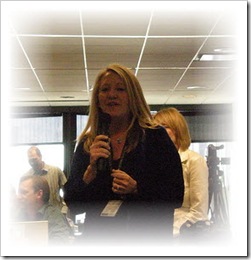
Gail Lynne Goodwin presenting at SSOBCon: Biz School for Bloggers

While at SOBCon: Biz School for Bloggers back in May, I had the pleasure of meeting Gail Lynne Goodwin. Overflowing with enthusiasm and passion – and a hug for everyone – I understand why she founded InspireMeToday.com, a website which provides great inspiration from a different luminary each day.

Gail kindly invited me to be a inspirational luminary:

Imagine you had to leave only 500 words as the very best of what you’ve learned in your life, and as a gift to the world. What would you say? This is not your bio or your life story. The goal of this piece is to inspire our readers to live up to their full potential and fully live their dreams.

Who needs coffee when that kind of challenge is given to you early in the morning? After months of procrastination, I finally wrote my message, which came down to one word: try.

To read my message and to be inspired by other luminaries, you will need to register, which is quite simple, but definitely worth it. Go be inspired!

What would be your message to the world? 

Technorati Tags: ,

If you enjoyed this post, consider buying me a chai tea latte. Thanks kindly.
Related Posts

WordPress Misses the #1 Accessibility Tip

Filed under: Blog Accessibility — by at 6:22 pm on Monday, September 28, 2009

Today I am fine tuning my “How POUR is Your Blog?” presentation for WordCamp Las Vegas at BlogWorld. In my original presentation I pointed out a flaw in the way the blogging platform WordPress handles alt attributes with images. With WordPress 2.8.4 now in widespread use, I checked to see if the issue had be rectified, in hopes of updating my presentation. Sadly, the issue remains unresolved.

Allow me to provide some background information… In web page design, the alt attribute provides a text equivalent for those individuals unable to see the image. For individuals who are blind and who use text-to-speech or text-to-Braille screen readers, having images represented as text is the only way to access that information.

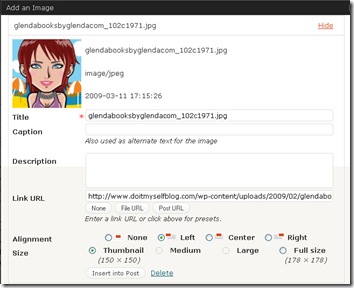
In earlier versions of WordPress and now in version 2.8.4, the software continues messing up the handling of the alt attribute. When inserting an image into a blog post; the blogger is presented with the following dialog box:

The

in this box, the blogger can add information about the image and adjust how it will be displayed in the blog post.

The image file name is automatically entered into the Title, an required field. In the example above, the default title becomes “glendabooksbyglendacom_102c1971.jpg”. If the blogger does nothing else, the alt attribute also becomes “glendabooksbyglendacom_102c1971.jpg”. This means an individual using a screen reader will hear “glendabooksbyglendacom_102c1971.jpg” in place of the image. If the screen reader is set to also read image titles, the individual will hear “glendabooksbyglendacom_102c1971.jpg” twice!

Totally useless!

If the blogger changed the title to one more meaningful, the alt would also change. However, this is also incorrect. The image alt and the image title are not the same information. They serve different purposes in html: the alt provides the text equivalent, the title provides additional information about the image.

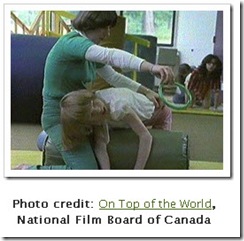
An image with a caption Similarly, if the blogger enters text in the Caption field, then that text becomes the alt text. Again this is wrong.

For example, when I first used the photo to the right, the caption provided the photo credit, whereas the alt read “Glenda reaching for a ring during a physio session", which provided equivalent information for when the image is not seen or not available. Again, the caption and the alt do not serve the same purpose and, thus, should not provide the same information.

Granted, bloggers could go into the html and manually add a correct alt. But, how many bloggers know enough html to do that? Likewise, how many would bother taking that extra step before hitting the Publish button?

WordPress could rectify this issue by simplifying the “Add an image” dialog box, making it more straightforward for bloggers to use and benefiting blog readers who rely on the correct use of the alt attribute.

I began in the web accessibility field back in 1998. Using alt attributes has always been the first tip I’ve offered when asked how to increase a site’s accessibility. For a blogging platform committed to accessibility, why does the #1 accessibility tip continue to be an issue? How can we be nearing the end of 2009 and still talking about alt attributes?


For tips on writing alts and other tips on increasing your blog’s accessibility, download the free ebook “How POUR is Your Blog? Tips for Increasing Your Blog Accessibility”.

Technorati Tags: ,

If you enjoyed this post, consider buying me a chai tea latte. Thanks kindly.
Related Posts

« Previous PageNext Page »