Do It Myself Blog – Glenda Watson Hyatt

Motivational Speaker

Why Barack Obama’s Inauguration Fills Me with Hope

Filed under: Living with a disability — by at 12:32 am on Tuesday, January 20, 2009

On the eve of Barack Obama’s inauguration, I find myself reflecting upon the significance of an African-American becoming President of the United States.

I humbly admit that I do not know what it is like to be discriminated against and discounted solely because of the colour of my skin. I have not experienced racial segregation or the humiliation of being forced to use a side entrance because I am seen as less than a person. I have not personally witnessed the atrocities committed against the Blacks.  I have not felt the sting of systemic racial inequality in the workforce.

However, I do know what it is like to be discriminated against and discounted solely because of my disability – or perceived disability. I have experienced segregated classes and programs specifically for the disabled. I have experienced the feeling of less than when using an accessible entrance around the back. I have been sickened by the appalling treatment of far too many people with disabilities. I face the sting of living below the poverty line and being on social assistance, for now.

If an African-American President can reside in the White House, empowering all African-Americans and quashing racial discrimination, then hope exists that discrimination based on disability can also be overcome and we can all be “judged on the content of our character”.

In his speech on Sunday from Lincoln Memorial, President-elect Barack Obama spoke these words, filling me with hope:

…a belief that if we could just recognize ourselves in one another and bring everyone together – Democrats, Republicans, and Independents; Latino, Asian, and Native American; black and white, gay and straight, disabled and not – then not only would we restore hope and opportunity in places that yearned for both, but maybe, just maybe, we might perfect our union in the process….

Together, yes, we can!  

If you enjoyed this post, consider buying me a chai tea latte. Thanks kindly.

Random Posts

WordPress 2.7: A Brief Accessibility Review

Filed under: Blog Accessibility,Blogging — by at 10:52 pm on Wednesday, January 14, 2009

The past couple of weeks, Darrell and I have been giving his website an extreme makeover (no link because it isn’t quite ready). We have been using WordPress 2.7, which has given me the opportunity to get a feel for it before upgrading WordPress on my own blog.

In the short time I have been using the latest version of WordPress, I have discovered a few issues that can easily be remedied to further increase the accessibility of the most popular blogging platform. 

Colour Contrast

After the initial disoriented feeling of a completely redesigned dashboard (main controls page), the first thing that struck me was the colours. They are rather subdued, without much distinction.

Pulling out the colour contrast analyzer on the nifty Web Accessibility Toolbar, I tested several of the colour combinations on the page. Some did not pass the contrast test necessary for enhancing readability.
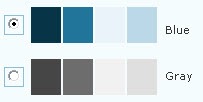
Samples of the colour combinations used in WordPress 2.7

With some digging, I found the option for changing the colour scheme (Users > Your Profile > Personal Options):
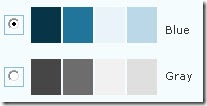
WordPress 2.7 offers two colour schemes - blue and gray

Switching to the blue scheme does more easily distinguish the various sections. However, some of the colour combinations still do not maximize colour contrast to enhance readability.

With such a customizable dashboard, the option for bloggers to choose their own colour scheme to suit their particular needs and tastes would further increase and improve the customization of WordPress.

Keyboard Shortcuts

Poking around further, I discovered keyboard shortcuts had been added to the visual editor used for writing posts. For someone who relies on the keyboard, these shortcuts makes life easier.

Searching the help, I could not find a list of available keyboard shortcuts, except the ones for comment moderation. Unless I have missed something, the only way to discover the shortcuts is to hover the mouse over editor buttons, which defeats the whole purpose of keyboard shortcuts.
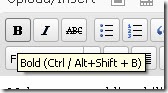
The keyboard shortcut for bold

The keyboard shortcut for Bold is given as Ctrl / Alt + Shift + B. I have never seen a “/” in a keyboard shortcut before. What does it mean? Do I actually hit “/”? Does it mean either the Ctrl or the Alt? I could not figure it out for the life of me. Out of sheer frustration, I tried the Bold shortcut that most other PC programs use: Ctrl + B. It worked! The standard Ctrl + I worked for Italic.
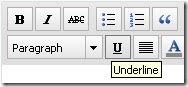
No keyboard shortcut shown for underline buttonAlthough a keyboard shortcut is strangely not given for Underline, the standard shortcut does work: Ctrl + U.

A list of functioning keyboard shortcuts available in WordPress 2.7 would be helpful. Even sweeter would be if that list was visible while writing a post.

Images

After upgrading my blog to WordPress 2.5.1 a while ago and being baffled by the “Add an Image” dialog box, I was hoping the 2.7 version would be more straightforward. No such luck. They are essentially the same.

When I uploaded an image for test purposes, the 2.7 version showed the full image (rather than a scaled size, completely messing up the rest of the box:
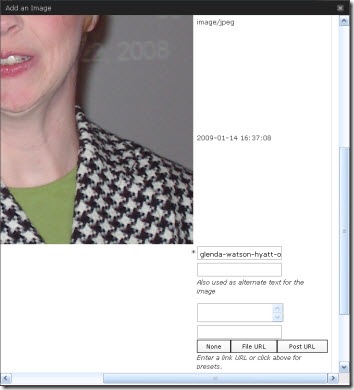
A screen shot of a portion of the "Add an Image" dialog box

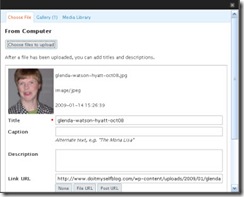
Screen shot of the "Add an Image" dialog box in WordPress 2.5.1 Using the 2.5.1 version for guidance, I am assuming the three text boxes are for entering the Title, Caption and Description. From here, the Title, whose default is the filename, becomes the image title; the Caption becomes the alterative text <ALT>; and the Description seems to disappear and is pointless. Confused yet? I am!

The code comes out as:

<img src=”http://enablingabilities.com/wp-content/uploads/2009/01/glenda-watson-hyatt-oct08.jpg” alt=”Glenda Watson Hyatt” title=”glenda-watson-hyatt-oct08″ class=”alignleft size-full wp-image-79″ />

The thing that really bugs me is, in the “Add an Image” dialog box, the Title is marked as a required field, not the Caption that becomes the ALT: a crucial piece in web accessibility.

It is the ALT text that enables an individual using a text-to-speech screen reader to hear what an image is; not the TITLE. It is the ALT text that appears on the webpage when an image does not load; not the TITLE.

To encourage bloggers to provide an ALT for every Image, make the Caption a required field; better yet, name the field what it is – the Alternative Text.

With these and other changes, Matt Mullenweg and his development team will continue strengthening WordPress’ commitment to accessibility.

If you enjoyed this post, consider buying me a chai tea latte. Thanks kindly.
Random Posts

Canada’s Registered Disability Savings Plan – The World’s First!

Filed under: Living with a disability — by at 2:52 pm on Tuesday, January 13, 2009

Living on social assistance is like living in a perpetual catch-22. If you are thrifty enough to save a few dollars a month, you can’t officially save it because then that means the government is paying you too much and your benefits are reduced accordingly. Yet, occasionally you have expenses (say, a $1895 scooter and a $4300 paint levy for your condo) that social assistance doesn’t cover, but that you still must pay. Also, any sizeable financial gift from a parent or friend for said expense gets deducted from your monthly cheque. This leaves you resorting to creative financing (choosing my words carefully) and a few sleepless nights.

Until now.

Thanks to years of tireless effort by the Planned Lifetime Advocacy Network (PLAN), Canada has introduced the world’s first Registered Disability Savings Plan (RDSP):

a savings plan designed specifically for people with disabilities in Canada. The first of its kind in the world, this new tax-deferred savings vehicle will assist families in planning for the long – term financial security of their relatives with disabilities.

According to PLAN, a RDSP is similar to a Registered Retirement Savings Plan (RRSP) and “is designed specifically for people living with a disability. It allows anyone already eligible for a disability tax credit to invest savings tax-free until withdrawal, up to a lifetime limit of $200,000. Friends and family members can also contribute to the RDSP of a loved one.”

To encourage Canadians with disabilities to open RDSPs, the Government of Canada has established the Canada Disability Savings Grant and the Canada Disability Savings Bond, which will match eligible contributions, significantly increasing the savings in a plan. (The Canada Revenue Agency provides further information on RDSP.)

For British Columbians with disabilities living on social assistance, the pot became a little sweeter today with the provincial government announcing the Endowment 150 Fund which “will allow any British Columbian on income assistance to apply for $150 once they have set up an RDSP with $25.  This initial investment has the potential to leverage  a grant of $525 and a $1,000 federal bond. Within one year, clients can earn $1,700 plus interest from their original investment of just $25.”

The deadline for 2008 contributions has been extended to March 2, 2009. Currently, the Bank of Montreal is the only financial institution, outside of Quebec, offering RDSPs. The Vancouver City Savings Credit Union is developing a product, but it may not be available in time to make 2008 contributions. Other financial institutions are also likely in the process of developing similar products. However, only contributions made by March 2nd will be eligible for the 2008 matching funds by the federal government.

A word of caution: as with any financial investment, read all of the fine print and details, and talk with a reputable person to make sure a RDSP is right for you or a loved one with a disability.

Watch the Registered Disability Savings Plan Blog for the latest updates and information.  (Tip: “Subscribe by email” to receive the updates in your inbox. It saves constantly checking the blog.)

If you enjoyed this post, consider buying me a chai tea latte. Thanks kindly.
Random Posts

Are You Preventing Customers from Entering Your Store?

Filed under: Accessibility 100 — by at 1:29 am on Friday, January 9, 2009

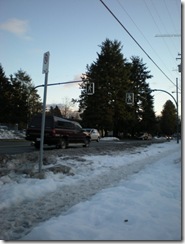
Accessibility 100 Our snowy roadAfter feeling incarcerated for nearly four weeks, Darrell and I escaped our house arrest, barely. Our street is still down to one lane, shared by cars and pedestrians. Being in wheelchairs, stepping sideways into the snow, out of the way of oncoming cars, is impossible. Navigating the road, while people are driving home after work would definitely not be safe.

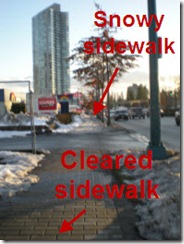
Sidealk is partially covered by snow and partially shoveledOnce down our street, we discovered (though weren’t surprised) that cleared sidewalks were hit and miss. Some businesses had shoveled their sidewalks; others had not. Some curbcuts (ramps in sidewalks) were cleared, while others were not, making crossing to the sidewalk on the other side of the street unsafe.

Sidewalk covered with snowDarrell and I were able to get to Staples to exchange a faulty Christmas gift and to the mall for our monthly treat at Tim Hortons. Getting to the grocery store didn’t look promising.  Good thing we are still well stocked, thanks to Mom!
 

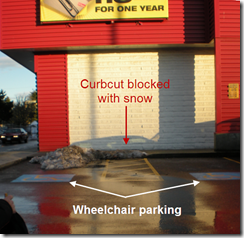
Wheelchair parking with curbcut blocked with snowDear Businesses,

When clearing snow, please also clear the curbcuts and all sidewalks around your property. Otherwise, customers using wheelchairs, walkers and other mobility aids and those unsteady on their feet cannot enter your store to spend money.

Thanks kindly,
Glenda


Accessibility 100 is a series of 100 easy-to-implement, free and inexpensive tips for improving accessibility for people with disabilities. This is a community project. Feel free to leave your comments, questions and ideas for future Accessibility 100 posts.

Get the entire series by subscribing to this blog by filling in the form in the upper right corner or by subscribing to the RSS feed.

If you enjoyed this post, consider buying me a chai tea latte. Thanks kindly.
Random Posts

Combining Two Passions to Build an Accessible Blogosphere

Filed under: Blog Accessibility — by at 6:14 pm on Tuesday, January 6, 2009

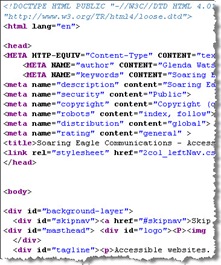
A sample of HTML code One day while taking a pre-employment program for people with disabilities back in 1996, the computer instructor introduced me to HTML — the computer language used for developing websites — as a way to keep me busy and suitably challenged. I absorbed the material like a sponge and then asked for more. I soon realized that, even though the medical professionals labeled me as functionally non-verbal, I now had a way to communicate with the world (or, at least with those who had internet access). How liberating!

A couple of years later, while working at my one and only J O B, I stumbled across the concept of web accessibility. Like the brick n mortar world, websites create obstacles for people with disabilities, particularly for those using assistive technology. Having learned the basics of the screen reader JAWS and screen magnification software ZoomText for a previous project and feeling limited and disoriented using the technology, I appreciated some of the barriers people with sight impairments may face when navigating the web.

I discovered the World Wide Web Consortium’s (W3C) Web Accessibility Initiative and the then new Web Content Accessibility Guidelines 1.0. I took a few online course through Equal Access to Software and Information (EASI) and joined the Web Accessibility In Mind (WebAIM) forum. Essentially, I soaked up everything I could about making websites accessible for people with disabilities; all kinds of disabilities.

I had been interested in physical accessibility and possibly parlaying that into some kind of consultancy, but traveling around, measuring the width of doorways and the height of grab bars didn’t seem a realistic career move. On the other hand, applying similar accessibility guidelines to websites from the comforts of my own home definitely had potential.

Accessible online communications became my business idea when I entered the Self-Employment Program. As the program came to an end, I landed my first paying gig: to develop guidelines for choosing colour schemes readable by individuals with colour blindness for a now defunct dot com company that was designing the provincial government’s website. I had no knowledge of colour blindness, and the nifty colour contrast analyzing tools didn’t exist back in the late 90s.

As I began digging into the issue, I discovered that little research had been done on it at that time. After asking questions via email of various people in the field, I developed guidelines for choosing colour schemes for people with colour blindness. The next project was to actually choose several colour schemes, which were then implemented on the Government of British Columbia’s website. That was quite a “heady” experience to visit the provincial government’s site and see my colour choices being used. I had accomplished something and had made a difference for those people who have trouble distinguishing different colours.

Several other gigs came along the way including writing the Simplified Web Accessibility Guide and co-writing its companion Accessible Online Labour Market Information: A Guide for Developers. I conducted several Web Accessibility Audits for various organizations and wrote several articles on web accessibility issues, some of which are listed in my virtual portfolio.

Over time websites changed and other programming languages were added to the mix. I felt like this red-headed chick wasn’t geeky enough to keep up with the pace of change. Although I was still passionate about making websites accessible so that people with disabilities could use and benefit from the web, I was less and less confident that I could provide clients with the depth of expertise they required and that one day I would be “found out”.

In my autobiography I’ll Do It Myself, I even shared:

Although I have done some interesting work and have become somewhat known in the web accessibility field, I don’t think I have yet hit my full potential. Because the work has been fairly sporadic, I feel it is time to explore other opportunities.

I then discovered blogging and set to learning as much as I could, only to soon realize knowing everything about this new form of communication is nearly impossible. I was quite content diving into this “passing fad” as one employment counsellor aptly called blogging. Yet, paying projects still landed in my lap without needing to chase after them. The most recent ones being a 2010 Olympic-related site and a public transit site in Toronto.

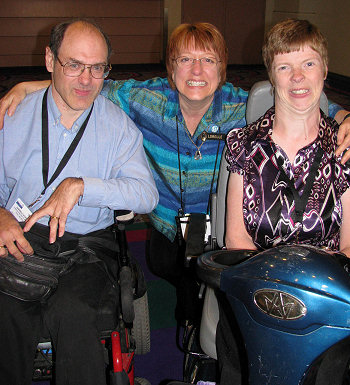
Darrell Hyatt, Lorelle VanFossen and Glenda Watson Hyatt at BlogWorld Expo in Vegas Fast forward to last September in Las Vegas where I met WordPress diva Lorelle VanFossen. Talking with her for the short time we had together, I sensed there was a great need for web accessibility within the blogging community. Individuals are attracted to blogging because it is a relatively easy way to share their stories and knowledge and to build a community of like-minded people. However, because many bloggers come to blogging with minimal, if any, web design experience, they are doing small things that unintentionally exclude individuals from their blogs; things that can easily be rectified.

Over the past few weeks I have decided to — rather than resisting the frequent pulls back into the web accessibility field — embrace those pulls and to share what I do know about web accessibility with fellow bloggers to build an accessible, inclusive blogosphere. To this end, I have several exciting plans to serve web accessibility to bloggers in 2009. My challenge will be serving it in a relevant and not-too-technical way. Stay tuned!

If you enjoyed this post, consider buying me a chai tea latte. Thanks kindly.

Random Posts

« Previous PageNext Page »