Do It Myself Blog – Glenda Watson Hyatt

Motivational Speaker

3 Tips for Making Your Hyperlinks More Usable

Filed under: Accessibility 100,Blog Accessibility — by at 5:11 pm on Wednesday, February 11, 2009

How many times do you skim an online article or blog post, looking for interesting or relevant links? Individuals with sight impairments using screen readers (software that reads aloud text on the computer monitor) can have the software scan for hypertext links. However, oftentimes, the purpose of the hyperlink is difficult to determine. Similarly, individuals with other types of disabilities may face other obstacles while trying to use hyperlinks.

Web designers and bloggers can easily improve hyperlink usability by implementing the following three tips:

Tip #1: Make hypertext links informative when read out of context.

Imagine what individuals using screen readers would hear in the following example:
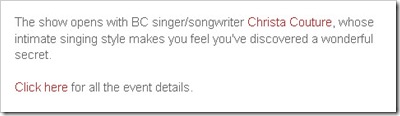
Examples of poorly written hypertext links, including "Click here"

In this example, the links “Christa Couture” and “Click here” are meaningless when read out of context. These individuals do not have any clue where the links will take them. The links should be rewritten to read “British Columbia singer/songwriter Christa Couture” and “View event details”.

Tip #2: Make hypertext links succinct.

Imagine how time consuming the next link would be to listen to, if you are scanning for only links:
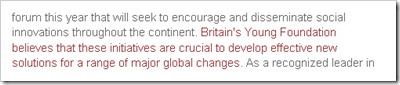
Another poor hypertext link: an entire sentence is linked  

Making an entire sentence a link is unnecessary and is sloppy.

Tip #3: Separate adjacent links with non-linked, printable characters.

Imagine how confusing these two adjacent links would be if you had double vision or how difficult selecting the small links would be if you had a shaky hand:

An example of a poor hypertext link: two adjacent links with no separating character

In this example, rewrite:

“…running two Group Research projects…” (where each hyperlinked word points to a separate link)

to read

“…running the Internet Marketing Group Research Project and the Community Building Group Research Project…” (where the project names are hyperlinked and separated by the non-linked word “and”).

Other printable characters that can be used for separating adjacent links include punctuation, pipe bar |, brackets [ ], parenthesis ( ), and slash /.

Additional resources on hypertext links

(Re-examine the first two examples for a clue to next Wednesday’s web accessibility tip…)

If you enjoyed this post, consider buying me a chai tea latte. Thanks kindly.
Random Posts

How Large Does Your Network Need to Be?

Filed under: Social Media,Work — by at 2:13 pm on Monday, February 9, 2009

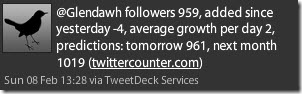
Each day when I log into the application TweetDeck to connect with my Twitter community, I receive an automated message informing me how many people are now followers:

Message from TwetDeck Services at twittercounter.com: GlendaWH has 959 followers, added since yesterday 0, average growth per day 2, predictions: tomorrow 961, next month 1019

Similarly, the AWeber counter in the upper right corner of this blog indicate how many people receive my blog posts via email:

86 readers by AWeber

Watching my network and my reach grow is exciting and rewarding. Interacting with new people often results in blog post ideas or in new opportunities; for example, if we can figure out the technology, I will be presenting via video at San Antonio’s AccessCamp on Saturday, February 21st.

However, the larger my network becomes, more and more people are pulling at me and wanting a piece of me for various reasons. I try to respond to everyone, but, in doing so, I am torn away from my work and plans.

How do you manage and respond to your network so it isn’t cutting into your productive time? How do you determine how large of a network you really need? Where is the balance point?

Your suggestions and advice are most welcomed!

Technorati Tags: ,

If you enjoyed this post, consider buying me a chai tea latte. Thanks kindly.

Random Posts

7 Ways to Communicate When Speech Impaired

Filed under: Living with a disability — by at 1:36 pm on Wednesday, February 4, 2009

Reader's Question

A young man with athetoid spastic cerebral palsy emailed me last week. He uses a Dynavox communication device and asked how I communicate, given my speech impairment, in hopes he may benefit from how I do it.

Glenda's Response

I am responding here in case how I communicate also benefits or triggers ideas for some of my other readers. I use a variety of communication methods; the method I use depends upon the situation.

Here are seven methods I use to communicate:

  1. Speak Glenda-ish: People who know me and strangers who take the time to actually listen do understand my unique dialect. Once individuals master Glenda-ish, I can talk their ears off for hours! In fact, only medical professionals have used the label non-verbal because they don’t take the time to try to understand me.
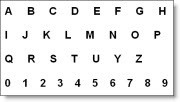
  2. A sample alphabet card Use an alphabet card: I have made several variations of this low-technology communication device over the years. During my university years, my alphabet card became my security blanket: I didn’t leave my apartment without it. 
  3. Type notes: For short messages like “I would like a book of stamps, please” or “I would like off at the bus stop near Laurel and Canada Way, please”, I type out a note before leaving home.  Post-It notes are great for this purpose. 
  4. Use Kate with PowerPoint: When giving a presentation, I convert the text into speech using TextAloud and NeoSpeech’s Kate voice. I then embed the sound files within my Microsoft Powerpoint presentation.  The process is time consuming, but it works!
  5. Use my laptop: When having a small group discussion with individuals not well-versed in Glenda-ish, I type my point on my laptop and then either have Kate read it aloud or have a fellow group member read it off the screen.
  6. Send email: Email has enabled me to communicate with people I would not have otherwise. Because email is asynchronous, my slow typing speed is not a factor. I can take the time needed to express my thoughts in the written word, my most effective means of communication, before hitting the send button.
  7. Skype with webcam: With individuals somewhat familiar with Glenda-ish, I call them using Skype and my webcam. Watching me while I speak helps their understanding. If they get stuck on a particular word, then I use the text chat feature to type the word.

    Being labeled non-verbal or speech impaired does not mean I’m non-communicative.  It means finding other ways to get my message across. 

    If you enjoyed this post, consider buying me a chai tea latte. Thanks kindly.

    Random Posts

    Going Beyond Social Media to Connect Deeply

    Filed under: Living with a disability,Social Media — by at 4:06 pm on Tuesday, January 27, 2009

    Glenda Watson Hyatt and Lorelle VanFossen laughing it up Darrell and I are enjoying Lorelle VanFossen’s company following WordCamp Whistler (a day long session on using the blogging platform WordPress). While the snow falls yet again, we are having an intimate WordCamp Hyatt – you may notice some changes on my blog, and we’re having great conversations – many of which are unbloggable! But there is one story that is safe to share:

    Lorelle and her husband spent six years in Israel. The first year in the country, Lorelle struggled with the language, carefully choosing her limited Hebrew to communicate her message. Without being able to communicate freely with others around her, a feeling of isolation crept in As time passed, her Hebrew became somewhat more fluent and the isolation began melting away.

    Returning home to the United States, Lorelle was relieved to hear English all around her. She no longer had to struggle to make her point known in a few precious words. She could freely speak, using as many words as she liked. However, she then became aware of how much of the spoken word is wasted breath. People may utter many words without saying anything at all.

    Exactly!

    I now knew she understood how much of a struggle it is for me to speak Glenda-ish around others who don’t understand Glenda-ish; how much I struggle to find clear words to get my point across. But when I’m with people with a Masters in Glenda-ish, I can talk off their ears for hours!

    I am also amazed by the wasted words people speak. To me, those unnecessary words are such a waste of precious resource. Why do few people think before they open their mouth? Could this resource not be used more productively, more efficiently, more lovingly?

    While the three of us were sitting in Darrell’s office, talking, another equally valuable realization struck. All of this social media is awesome for meeting people and for maintaining surface relationships. Having all of these tools to connect with hundreds or even thousands of people is empowering and liberating. However, intimate face-to-face time is when the deep connections are formed and memorable moments are made.

    Regardless of the number of Twitter followers, Facebook friends or StumbleUpon subscribers, the time spent snowed in with Lorelle talking, laughing, eating and forming a deep connection will be a cherished memory for years to come.

    My advice to you: close TweetDeck, turn off your iPhone and take some time have a meaningful conversation and laugh with someone dear to you. Make a memory, today, that you will cherish for lifetime.

    If you enjoyed this post, consider buying me a chai tea latte. Thanks kindly.
    Random Posts

    Web Accessibility Not Only for People with Disabilities

    Filed under: Blog Accessibility — by at 1:59 pm on Wednesday, January 21, 2009

    While ringing in the New Year, I had for the first-time ever a clear vision and direction for the year: to share what I do know about web accessibility with fellow bloggers to build an accessible and inclusive blogosphere. But, what is web accessibility?

    For the most part, people understand the need for ramps, elevators, high contrast signage, flashing fire alarms and the such to make the physical world accessible to people with all types of disabilities. But accessible websites? Isn’t surfing the web simply “point and click”? For some individuals, no, using the web is not quite that simple.

    Like how people may enter your store using a wheelchair, walker, crutches or a guide dog, readers may visit your blog using assistive technologies (specialized hardware and software), mobile devices (i.e. iPhones and Blackberries) or even a dial-up connection.

    Web accessibility enables all individuals to utilize websites and blogs, regardless of their personal capabilities or the technology they use.

    Physical accessibility also benefits people without disabilities; for example, how many delivery guys hit the automatic door opener rather than trying to hold the door open while wheeling the cart through? Or, how many parents pushing baby strollers welcome curbcuts when crossing the street? Similarly, web accessibility also benefits people without disabilities.

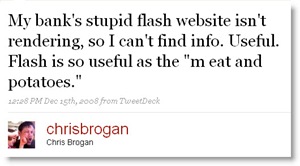
    Last month social media strategist Chris Brogan, who lives and breathes the web, sent the following sarcastic tweet when the Flash version of his bank’s website would not load for some unknown reason:

    Message from Chris Brogan: My bank's stupid flash website isn't rendering, so I can't find info. Useful. Flash is so useful as the "meat and potatoes."

    Because his bank also had a HTML-only version, an accessibility must for these types of situations, I found him the link and Chris was able to access the information he needed. (Note: perhaps the link to the HTML version needs to be in a more prominent location!)

    Web accessibility benefits nearly everyone without most people realizing it until they cannot do something they want to.

    If you enjoyed this post, consider buying me a chai tea latte. Thanks kindly.

    Random Posts

    « Previous PageNext Page »