Do It Myself Blog – Glenda Watson Hyatt

Motivational Speaker

Cerebral Palsy and Menopause Does Not Exist According to Google

Filed under: Living with a disability — by at 2:28 pm on Thursday, March 19, 2009

A few weeks ago, I purchased Dr. Christiane Northrup’s The Wisdom of Menopause, in preparation for “the change of life”. Flipping through the list of possible the symptoms, I came across:

  • Hot flashes. If they occur during the winter months, that will be one way to save on the hydro bill!
  • Insomnia. Needing to get up two or three times a night to pee doesn’t make for a restful and restorative night’s sleep.
  • Forgetfulness. Like, while making my breakfast, I reach in the dishwasher for a clean knife and put it beside the one I pulled out a moment ago? Doh! Is that forgetfulness or the result of being dead tired because I was up three times the night before?
  • Brain changes. Whoa! What?

Let’s read that again!

Our brain actually begin to change at perimenopause. Like the rising heat in our bodies, our brains also become fired up! Sparked by the hormonal changes that are typical during the menopausal transition, a switch goes on that signals changes in our temporal lobes, the brain region associated with enhanced intuition.… There is ample scientific evidence of the brain changes that begins to take place at perimenopause. (from p. 38)

For someone with cerebral palsy (i.e. brain damage), this is not  comforting news. I am still figuring out how my cerebral palsy works. I just discovered wearing a scarf on cold days reduces my gagging. All those early morning university classes, I thought that gaggy feeling was due to eating breakfast before a half-decent hour. I now discover it was probably because my neck and throat weren’t cozy warm. Now some hormones are going to mess up what I do know about handling my cp? Great!

And, for someone who had rare temporal lobe seizures as a young child – I’d have crying and screaming episodes during the night without waking up and ended up on phenobarbitol for several years, which is likely another contributing factor to my osteoporosis (but that is another story) – the fact that the temporal lobe is specifically mentioned is even less comforting. Will these temporal lobe changes reignite my seizures? I’d like to know what I could be in for.

So I did what most people would do as the starting point…I googled it. Googling cerebral palsy AND menopause AND temporal lobe resulted in no useful information; not even close. Broadening the search to cerebral palsy AND menopause resulted in vague, general information; nothing that was particularly useful and insightful without paying for a medical Journal subscription.

If Google doesn’t provide, at least, the starting point, what is a perimenopausal woman with cerebral palsy to do?

If you enjoyed this post, consider buying me a chai tea latte. Thanks kindly.

Related Posts

WordPress vs Live Writer: The Image Smackdown

Filed under: Blog Accessibility,Blogging — by at 12:32 am on Thursday, March 12, 2009

WordPress versus Windows Live Writer In my blogging, I use both the blogging platform WordPress 2.7 and the offline editor Windows Live Writer 2009 for writing the posts. I have been amazed by how differently the two applications handle images. In fact, I have often wondered, usually late at night, which one is most accessible in terms of the images.

Today is the day to put the two applications in a byte-to-byte, no holds barred smackdown!

Round #1: Inserting an Image

The first step in inserting an image into a post is to identify the image.

In the Live Writer corner: the keyboard shortcut Ctrl + L opens the “Insert Picture” dialog box to choose the image from either my computer or from the web.
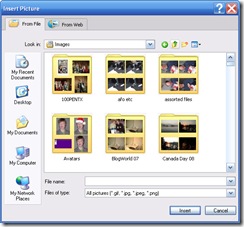
The Insert picture dialog box in Live Writer

In the WordPress corner: after some poking around, I found the keyboard shortcut Alt + Shift + M for inserting an image. This option is for an image that is already online.
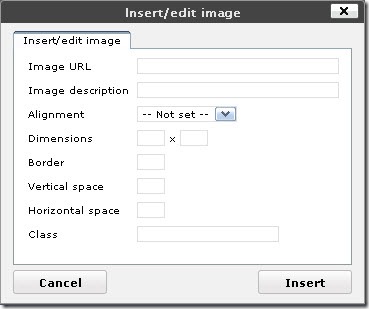
The Insert/edit image dialog box in WordPress

If, however, the image needs to be uploaded, I must use the “Add an Image” button on the Upload/Insert toolbar:

WordPress Upload/Insert Media toolbar - First button is "Add an Image"

After some more poking around and reading Using Images in Posts, I could not find a way to activate the “Add an Image” button using the keyboard. Even by tabbing, I couldn’t reach the button.

According to the Authoring Tool Accessibility Guidelines (ATAG) 2.0 – Working Draft, which applies to both WordPress and Live Writer, “Authors with a wide range of abilities must be able to operate the functions and components of the authoring tool user interface.” Unless I missed finding a way to access the “Add an Image” button using the keyboard, this function is not available to bloggers relying solely on the keyboard.

Round #2: Using the Interface

The next step in inserting images into a post is to set the positioning or alignment, and to enter the alternative text (alt) to benefit individuals using screen readers and to make it searchable by search engines.
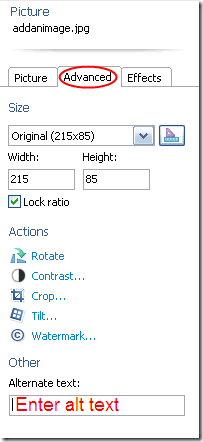
Picture panel - advanced tab in Live write Writer In the Live Writer corner: a straightforward interface in a sidebar for manipulating images. After poking around for at least half an hour, I could not find a way to get from the main Writer window to Picture side panel using the keyboard. That doesn’t mean a way doesn’t exist; I simply didn’t find it. Once in the side panel, the settings are operable via the keyboard. However, switching between the three tabs – Picture, Advanced, and Effects – using the keyboard also remains a mystery.

Under the Advanced tab, the alt text can be entered. Advanced? Alternative text is crucial to accessibility. One penalty point!

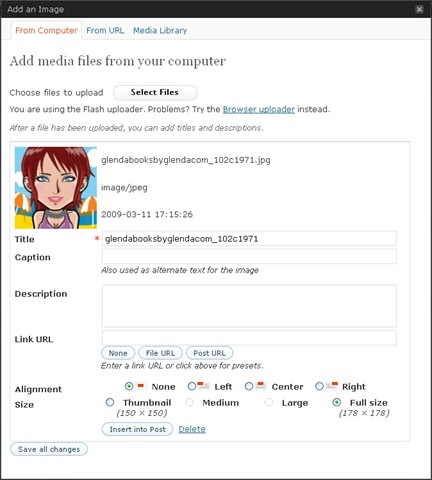
In the WordPress corner: the dialog box is not straightforward:
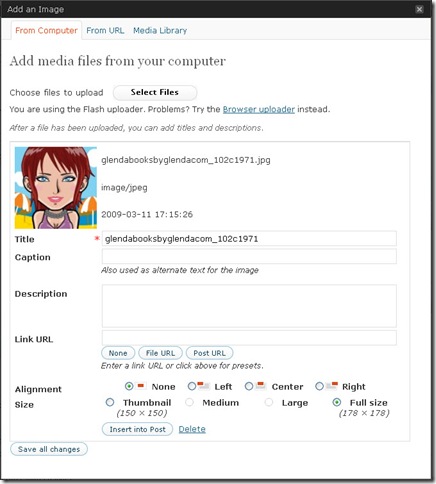
Add an image dialog box in WordPress 2.7

I am presented with four text boxes (or fields) without a clear understanding of what they are for. The Title box is marked with a red asterisk, likely indicating a required field; yet a note under the Caption box says “Also used as alternate text for the image. The Title is required, but the Caption is the alt? One penalty!

William Lawrence kindly explained the four fields in a comment on WordPress 2.7: A Brief Accessibility Review:

When inserting an image with WordPress all that is required is the Title which then gets used for the title and alt attribute of the image element. This is kind of good, because it kind of meets ATAG requirements, however because the content in the title and alt attributes are duplicated, this is inappropriate as it duplicates the context of the content. In addition, if one does not change the title of the image from an improper file name, the meaning is lost.

When one adds caption text, this additional text is placed next to the image and alt attribute of the image, while the title attribute of the image remains the title, or filename, of the image. This is kind of okay because now the image element no longer has duplicate content for these attribute, however the alternative text for the image now repeats what duplicated in the content of the article: inappropriate and repetitive.

Meanwhile, the description text is used as content for Attachment post page if one chooses to publish each image as a separate attachment post. More information can be found on their Codex for Using Image and File Attachments.

I need a flow chart to follow that! Another penalty.

Tip for bloggers: Because these two applications and many others do use the filename for the default alt text, make the filename more descriptive (and use a hyphen or underscore between words) when originally saving the image on your computer. This may not be the ideal alt, but it might prompt you to then revise the text when inserting the image.

Round #3: Validating the Code

Besides being accessible to me – the blogger, the application must also output content that is accessible to the blog readers. One way of measuring the content’s accessibility is to see whether the published code validates using a tool such as the W3C Markup Validation Service

In the Live Writer corner: the published code –

<img title="Glenda’s avatar" style="border-right: 0px; border-top: 0px; display: inline; margin-left: 0px; border-left: 0px; margin-right: 0px; border-bottom: 0px" height="178" alt="Glenda’s avatar" src="http://www.doitmyselfblog.com/wp-content/uploads/2009/02/glendabooksbyglendacom_ 102c1971.jpg" width="178"  align="left" border="0" />

– validates with no errors!

In the WordPress corner: the published code –

<div id="attachment_559" class="wp-caption alignleft" style="width: 188px"><img class="size-full wp-image-559" title="Glenda’s avatar" src="http://www.doitmyselfblog.com/wp-content/uploads/2009/02/glendabooksbyglendacom_ 102c1971.jpg" alt="Cute chick!" width="178" height="178" /><p class="wp-caption-text">Cute chick!</p></div>

– validates with no errors!

Frankly, I am surprised by this round’s results. This round was the one that had me wondering late at night. I thought the deprecated elements (code no longer used) and the repetitiveness of the title (in Live Writer) and the Caption (in WordPress) would have been marked as errors.

Bonus Round: Additional features

Although not directly related to accessibility, having extras for manipulating images are quite handy. It saves having yet another application open and switching between the two. Glenda's avatar with the added features of photopaper and slightly tilted

In the Live Writer corner: a variety of borders and actions (i.e. rotate, crop and watermark) that can be applied to images to add interest.

In the WordPress corner: zilch! WordPress is down. Its a knockout!

In terms of the accessibility of using images in posts, the winner is…Windows Live Writer!

If you enjoyed this post, consider buying me a chai tea latte. Thanks kindly.
Random Posts

Are Negative CAPTCHAs Any More Accessible?

Filed under: Blog Accessibility — by at 7:30 pm on Thursday, March 5, 2009

An example of a difficult to read CAPTCHA This morning I sat down to finish writing the “Do CAPTCHAs prevent your readers from commenting?” section for my upcoming ebook Web Accessibility for Bloggers. CAPTCHAs (short for Completely Automated Public Turing test to tell Computers and Humans Apart) pose many accessibility issues.

I recalled that, in a previous post about web accessibility, a reader offered negative CAPTCHAs – whereby spambots must prove they are bots rather than requiring humans prove they are indeed human when leaving blog comments – are accessible alternative. I googled negative CAPTCHAs to learned more about this alternative and started with Damien Katz’s Negative CAPTCHA.

Reading through the comments, which can be more informative and insightful, the following points were mentioned:

  • “a legitimate user on a browser which either doesn’t support or doesn’t have CSS enabled could fall for it”;
  • some browsers auto fill form fields and, thus, could conceivably fill in the hidden field;
  • a smart programmer could program bots to look for the hidden CSS tags and discard those field responses;
  • screen readers (software used by individuals with sight impairments) vary widely in how they react to hidden or invisible information as demonstrated by  Bob Easton’s research results (note: you would want a n/n for this instance);
  • “if you’re hiding a form field called "e-mail" from stupid bots, why not also include some explanatory text like "if you’re a human, don’t type anything in here–its just a trick to weed out spambots." sighted users will see nothing ’cause you’ve used js/css to hide the whole thing but the blind or people using lynx will read/hear an explanation.”

The discussion continued, but by then my eyes were spinning in their sockets and I was desperately craving chocolate! All I wanted to know was whether negative CAPTCHAs are accessible. Once again i was reminded that accessibility isn’t always a clear cut yes or no, but rather a continuum, which my clients always hate hearing.

So, I am taking the question to my brilliant and insightful people: Are negative CAPTCHAs any more accessible? Are they an appropriate alternative to the distorted characters in images used for blocking spam? If a blogger is using a good spam engine, such as Askimet, and requiring that the first comment of new readers be moderated (with an accompanying “Your comment is awaiting moderation” message – coming soon to this blog), is there even a need for CAPTCHAs to keep spam off blogs?

What are your thoughts on this topic?


A captcha with an audio feature Putting the ebook aside for the day, I next checked my email. In there was Viddler’s monthly newsletter announcing the release of its newest version, including “Captcha on forums” – like that is a good thing?! <insert sound of web accessibility consultant banging her head against the wall>

If you enjoyed this post, consider buying me a chai tea latte. Thanks kindly.
Random Posts

Are Spider Plant Babies Better than SEO?

Filed under: Blogging — by at 8:47 pm on Tuesday, March 3, 2009

Last night I wrote a post, sharing my experience with feeling overwhelmed and the search for a well-balanced and meaningful life. When I began writing, I had a vague direction for the post, but I didn’t have a clear message or lesson that I wanted to teach. I let the words flow in the direction they wanted to.

When I was at the end, I briefly considered adding an image for eye candy and then decided to allow the words stand on their own. I hit publish at 11:46pm, tweeted about the post and went to bed.

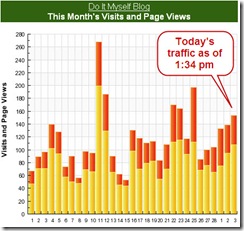
By the time I turned on my computer this morning, there were already comments from four readers (including one new reader), an email response from a colleague, two people had retweeted about the post, three people had tweeted about my blog, a reader in Japan had bought me a cup (or two) of coffee, a copywriter’s offer for free assistance with the pending ebook on web accessibility for bloggers, and the blog traffic was spiking. Wow! What amazing results in less than twelve hours!

The blog's visits and page views for the last 30 days, with today's traffic beginning to spike by 1:34pm.

But why? The post wasn’t that spectacular. There were no images, no lists, no hyperlinks, no subheadings, no mention of blogosphere rock stars, and no contests. The title wasn’t even snazzy – it was slapped on before hitting publish. I definitely didn’t use any keywords. These are all strategies for increasing traffic and search engine optimization (SEO).

What was it that garnered such results?

Writing coach Joanna Young nailed the reason in a Twitter conversation:

Joanna YoungI think you managed to make your personal experience universal – something we could all relate to

Glenda Watson HyattThanks Joanna. One of those posts that wanted to be written. You know how that is, I’m sure. 😉

Joanna YoungI do, and of course, those are the ones we respond to… we ‘hear’ you. Plus there were the spider plant babies… 🙂

Mentioning spider plant babies did it? Had I only known…!

But seriously, as Joanna points out, I shared a personal experience that most people are experiencing. Who isn’t feeling overwhelmed by the amounts on their plates these days?

I wrote from my heart, my truth in that moment. I wrote to share but also to reflect. I didn’t feel the need to go searching for distractions while forcing out words. The words flowed through my left thumb. When those moments occur while writing, that is when writing is enjoyable, liberating and authentic. To me, that is what blogging is meant to be.

While writing yesterday’s post, I wasn’t concerned about using keywords or SEO. I wasn’t writing for search engines; search engines don’t connect and engage with thoughts, emotions and ideas. The amazing results named above are not due to search engines and page rankings, but thanks to people.  People connect and engage. People comment, tweet and stumble.

To engage readers, share your truth, write authentically and include a few spider plant babies.

Technorati Tags: ,,

If you enjoyed this post, consider buying me a chai tea latte. Thanks kindly.
Random Posts

Finding Balance and Meaning with Limited Energy

Filed under: Living with a disability,Motivation — by at 11:46 pm on Monday, March 2, 2009

Many moons ago, my only roles were daughter, sister, friend and student. With my particular cerebral palsy, every task in daily life takes extra effort and energy, and my pool of energy is finite. When I use energy in one task,  I have less for the next one. In fact, my speech therapist disliked when physio was scheduled first. I always arrived to her therapy room with my energy zapped.

In high school, I didn’t take a full course load so that I could keep up with the work load. Grades 11 and 12 took me three years to complete – something I wasn’t thrilled about, but it was the only way I could keep up without being completely drained and while still maintaining decent grades. That 8.75 hours for the Algebra 12 provincial and scholarship exams was brutal!Summers were for recovering and relaxing.

Next came university while living on campus, alone. For the most part, I received only four hours of homemaking assistance per week. The cooking, daily cleaning and paying bills became my responsibility, as well as being a student. Yet I wasn’t given any extra energy. Semester breaks were spent sleeping and vegging. By taking one or two courses per semester, including summer semesters, I completed my Bachelors of Arts in seven years, barely sane.

Since then, I have added the roles of wife, homeowner, aunt, in-law, author, book promoter, blogger, solopreneur, volunteer treasurer, mentor and countless other roles that escape me at the moment. Yet I still working with that same finite pool of energy. That line about exercising creates energy is pure bunk!

Several times in recent years I have felt that I was drowning, that I couldn’t keep up, that no matter how late Into the night I worked, it wasn’t enough.

Last week I was hitting that point again. Inhaling my two squares of dark chocolate was becoming earlier and earlier in the afternoon, and even that wasn’t doing the trick. I was tired and completely drained. The mere thought of attending the day and a half long Board meeting, for which I’m the Treasurer, brought on a nap!

The next three months are extremely full and busy (for my energy levels) and I cannot get sick now, which tends to happened when I am over tired. After talking with Mom and my friend, and tormenting myself for a few days with indecision, I decided to submit my Treasurer’s report and regrets via email, and I bailed on the Board meeting!

I thought I would spend the weekend feeling guilty for not honoring my volunteer commitment. But, instead, I felt freed!

I went offline from Friday afternoon until mid-afternoon today. No emailing, no blogging, no tweeting, no googling for three days!

Conquering Mount Laundry and finishing reading February’s issue of O Magazine in February were my accomplishments this weekend. And, that was enough for me! Reading in bed during the day felt so luxurious.

I realized that I could spend 24/7 at my computer, writing, networking, strategizing, mentoring and still not get done everything I want to, ought to and need to. But, really, is that a well-balanced and meaningful life? Is that the most efficient use of my finite energy?

I realized that the ebook on web accessibility for bloggers may not be ready to launch at SOBCon 09 – business school for bloggers in May in Chicago. Although that would be disappointing, it wouldn’t be the end of the world. I would survive!

I realized that there are other things I would like to do that aren’t done at the computer. My spider plant is finally having babies. I’d like to pot them and then macreme a hanging pot holder for my mother-in-law for Christmas. I haven’t macremed in years! I’d like to spend time with my local friends. I’d like to go on outings with my aunt now that she has electric scooter and is independently mobile again.

I’d like to have a part of my life that is lived away from my computer. I’d like to have a life where I don’t feel like I am constantly struggling to keep up.

For now, I realize I am tired. I am going to publish this post and go to bed. Everything else can wait until tomorrow. G’night and sweet dreams!

If you enjoyed this post, consider buying me a chai tea latte. Thanks kindly.

Random Posts

« Previous PageNext Page »